

1. Overview
Apache StormCrawler is an open source collection of resources for building low-latency, scalable web crawlers on Apache Storm. It is provided under the Apache License and is written mostly in Java.
The aims of StormCrawler are to help build web crawlers that are:
-
Scalable
-
Low latency
-
Easy to extend
-
Polite yet efficient
StormCrawler is both a library and a collection of reusable components designed to help developers build custom web crawlers with ease. Getting started is simple — the Maven archetypes allow you to quickly scaffold a new project, which you can then adapt to fit your specific needs.
In addition to its core modules, StormCrawler offers a range of external resources that can be easily integrated into your project. These include spouts and bolts for OpenSearch, as well as a ParserBolt that leverages Apache Tika to handle various document formats and many more.
StormCrawler is well-suited for scenarios where URLs to fetch and parse arrive as continuous streams, but it also performs exceptionally in large-scale, recursive crawls where low latency is essential. The project is actively maintained, widely adopted in production environments, and supported by an engaged community.
You can find links to recent talks and demos later in this document, showcasing real-world applications and use cases.
2. Key Features
Here is a short list of provided features:
-
Integration with URLFrontier for distributed URL management
-
Pluggable components (Spouts and Bolts from Apache Storm) for flexibility and modularity — adding custom components is straightforward
-
Support for Apache Tika for document parsing via
ParserBolt -
Integration with OpenSearch and Apache Solr for indexing and status storage
-
Option to store crawled data as WARC (Web ARChive) files
-
Support for headless crawling using Playwright
-
Support for LLM-based advanced text extraction
-
Proxy support for distributed and controlled crawling
-
Flexible and pluggable filtering mechanisms:
-
URL Filters for pre-fetch filtering
-
Parse Filters for post-fetch content filtering
-
-
Built-in support for crawl metrics and monitoring
-
Configurable politeness policies (e.g., crawl delay, user agent management)
-
HTTP fetcher based on OkHttp.
-
MIME type detection and response-based filtering
-
Support for parsing and honoring
robots.txtand sitemaps -
Stream-based, real-time architecture using Apache Storm — suitable for both recursive and one-shot crawling tasks
-
Can run in both local and distributed environments
-
Apache Maven archetypes for quickly bootstrapping new crawler projects
-
Actively developed and used in production by multiple organizations
3. Quick Start
These instructions should help you get Apache StormCrawler up and running in 5 to 15 minutes.
3.1. Prerequisites
To run StormCrawler, you will need Java SE 25 or later, and Apache Maven to generate and build the project.
Additionally, since we’ll be running the required Apache Storm cluster using Docker Compose, make sure Docker is installed on your operating system.
3.2. Terminology
Before starting, we will give a quick overview of essential Storm concepts and terminology that you need to know before starting with StormCrawler:
-
Topology: A topology is the overall data processing graph in Storm, consisting of spouts and bolts connected together to perform continuous, real-time computations.
-
Spout: A spout is a source component in a Storm topology that emits streams of data into the processing pipeline.
-
Bolt: A bolt processes, transforms, or routes data streams emitted by spouts or other bolts within the topology.
-
Flux: In Apache Storm, Flux is a declarative configuration framework that enables you to define and run Storm topologies using YAML files instead of writing Java code. This simplifies topology management and deployment.
-
Frontier: In the context of a web crawler, the Frontier is the component responsible for managing and prioritizing the list of URLs to be fetched next.
-
Seed: In web crawling, a seed is an initial URL or set of URLs from which the crawler starts its discovery and fetching process.
3.3. Bootstrapping a StormCrawler Project
You can quickly generate a new StormCrawler project using the Maven archetype:
mvn archetype:generate -DarchetypeGroupId=org.apache.stormcrawler \
                       -DarchetypeArtifactId=stormcrawler-archetype \
                       -DarchetypeVersion=<CURRENT_VERSION>
PowerShell
mvn archetype:generate `
  "-DarchetypeGroupId=org.apache.stormcrawler" `
  "-DarchetypeArtifactId=stormcrawler-archetype" `
  "-DarchetypeVersion=<CURRENT_VERSION>"
Be sure to replace <CURRENT_VERSION> with the latest released version, which you can find on central.sonatype.com.
During the process, you’ll be prompted to provide the following:
-
groupId(e.g.com.mycompany.crawler) -
artifactId(e.g.stormcrawler) -
Version
-
Package name
-
User agent details
| Specifying a user agent is important for crawler ethics because it identifies your crawler to websites, promoting transparency and allowing site owners to manage or block requests if needed. Be sure to provide a crawler information website as well. |
The archetype will generate a fully-structured project including:
-
A pre-configured
pom.xmlwith the necessary dependencies -
Default resource files
-
A sample
crawler.fluxconfiguration -
A sample YAML configuration file (
crawler-conf.yaml)
After generation, navigate into the newly created directory (named after the artifactId you specified).
| You can learn more about the architecture and how each component works together if you look into the architecture documentation. By exploring that part of the documentation, you can gain a better understanding of how StormCrawler performs crawling and how bolts, spouts, as well as parse and URL filters, collaborate in the process. |
3.3.1. Docker Compose Setup
Below is a simple docker-compose.yml configuration to spin up URLFrontier, Zookeeper, Storm Nimbus, Storm Supervisor, the Storm UI and the Storm logviewer:
services:
  zookeeper:
    image: zookeeper:3.9.3
    container_name: zookeeper
    restart: always

  nimbus:
    image: storm:latest
    container_name: nimbus
    hostname: nimbus
    command: storm nimbus
    depends_on:
      - zookeeper
    restart: always

  supervisor:
    image: storm:latest
    container_name: supervisor
    command: storm supervisor -c worker.childopts=-Xmx2g -c storm.local.hostname=localhost
    depends_on:
      - nimbus
      - zookeeper
    restart: always

  ui:
    image: storm:latest
    container_name: ui
    command: storm ui
    depends_on:
      - nimbus
    restart: always
    ports:
      - "127.0.0.1:8080:8080"

  logviewer:
    image: storm:latest
    container_name: logviewer
    command: storm logviewer
    depends_on:
      - supervisor
    restart: always
    ports:
      - "127.0.0.1:8000:8000"

  urlfrontier:
    image: crawlercommons/url-frontier:latest
    container_name: urlfrontier
    restart: always
    ports:
      - "127.0.0.1:7071:7071"
Notes:
-
This example Docker Compose uses the official Apache Storm and Apache Zookeeper images.
-
URLFrontier is an additional service used by StormCrawler to act as Frontier. Please note, that we also offer other Frontier implementations like OpenSearch or Apache Solr.
-
Ports may need adjustment depending on your environment.
-
The Storm UI runs on port 8080 by default.
-
Ensure network connectivity between services; Docker Compose handles this by default.
-
The topology runs in the
supervisorcontainer, wherelocalhostis the container itself. Seturlfrontier.host: "urlfrontier"incrawler-conf.yaml. Seeds are still injected from the host through127.0.0.1:7071.
After setting up your Docker Compose, you should start it up:
docker compose up -dCheck the logs and see if every service is up and running:
docker compose logs -fNext, access the Storm UI via http://localhost:8080 and check that a Storm Nimbus as well as a Storm Supervisor is available.
3.3.2. Compile
Build the generated archetype by running
mvn packageThis will create a uberjar named ${artifactId}-${version}.jar (matches the artifact id and the version specified during the archetype generation) in your target directory.
3.3.3. Inject Your First Seeds
Now you are ready to insert your first seeds into URLFrontier. To do so, create a file seeds.txt containing your seeds:
https://stormcrawler.apache.orgAfter you have saved it, we need to inject the seeds into URLFrontier. This can be done by running URLFrontiers client:
java -cp target/${artifactId}-${version}.jar crawlercommons.urlfrontier.client.Client PutURLs -f seeds.txtPowerShell
java -cp target/$artifactId-$version.jar crawlercommons.urlfrontier.client.Client PutURLs -f seeds.txtwhere seeds.txt is the previously created file containing URLs to inject, with one URL per line.
3.3.4. Run Your First Crawl
Now it is time to run our first crawl. To do so, we need to start our crawler topology in distributed mode and deploy it on our Storm Cluster.
docker run --network ${NETWORK} -it \
--rm \
-v "$(pwd)/crawler-conf.yaml:/apache-storm/crawler-conf.yaml" \
-v "$(pwd)/crawler.flux:/apache-storm/crawler.flux" \
-v "$(pwd)/target/${artifactId}-${version}.jar:/apache-storm/${artifactId}-${version}.jar" \
storm:latest \
storm jar ${artifactId}-${version}.jar org.apache.storm.flux.Flux crawler.flux
PowerShell
docker run --network $NETWORK -it `
  --rm `
  -v "${PWD}/crawler-conf.yaml:/apache-storm/crawler-conf.yaml" `
  -v "${PWD}/crawler.flux:/apache-storm/crawler.flux" `
  -v "${PWD}/target/$artifactId-$version.jar:/apache-storm/$artifactId-$version.jar" `
  storm:latest `
  storm jar $artifactId-$version.jar org.apache.storm.flux.Flux crawler.flux
where ${NETWORK} is the network Docker Compose created for these services, by default <project>_default, where Docker Compose derives <project> from the name of the directory holding docker-compose.yml. You can find this name by running
docker network lsAfter running the storm jar command, you should carefully monitor the logs via
docker compose logs -fas well as the Storm UI. It should now list a running topology.
In the default archetype, the fetched content is printed out to the default system out print stream.
| In a Storm topology defined with Flux, parallelism specifies the number of tasks or instances of a spout or bolt to run concurrently, enabling scalable and efficient processing. In the archetype every component is set to a parallelism of 1. |
Congratulations! You learned how to start your first simple crawl using Apache StormCrawler.
Feel free to explore the rest of our documentation to build more complex crawler topologies.
3.4. Summary
This document shows how simple it is to get Apache StormCrawler up and running and to run a simple crawl.
4. Migrating to 4.0.0
This section covers upgrades from 3.7.0 to 4.0. Each entry says who is affected and, where needed, what to do. For other changes, see the release notes. When upgrading from an earlier 3.x release, also read the release notes of the versions in between.
-
Upgrading applies to every crawler.
-
Crawler configuration and behaviour applies to crawlers which use the keys or modules named in its entries.
-
Stored data applies to crawls which reuse data stored before the upgrade.
-
Metrics and output formats applies to crawls whose metrics or output are read by other tools.
-
Custom Java code applies to projects with their own Java classes.
4.1. Upgrading
4.1.1. Upgrade steps
-
If a crawl using the SQL module may need a rollback to 3.x, back up its status table first (see Stored data).
-
Upgrade the Storm cluster and its JDK, and update the project, as described in Java and Storm and Project changes.
-
Fix the build of custom classes, as described in Custom Java code.
-
Review the configuration against Crawler configuration and behaviour.
-
Start the topology. It fails at startup when a filter file names a class removed in 4.0, and on an invalid IP filter rule, Tika configuration or jsoup XPath expression or a
FastURLFilterrule without a type. Ifhttp.basicauth.hostsorhttp.custom.headers.hostsis empty, those credentials are not sent and a warning is logged. -
After the first crawl, compare a few URLs from the cases below with their records from before the upgrade: fetch status, extracted content and stored keys. These cases change what is fetched, parsed or stored without stopping the topology. The list is not complete.
-
robots.txt redirects to another host, and robots.txt files over 512 KiB
-
redirects on sites whose robots.txt lists sitemaps
-
hosts with invalid certificates or non-public IP addresses
-
file:URLs -
cookies without a
Domainattribute -
sitemaps without
isSitemapin their metadata -
sitemaps and feeds with many entity references
-
pages with a charset declared in the HTTP
Content-Type -
Tika metadata keys, embedded documents and the MIME type whitelist
-
custom JSoupFilters, which now also run on Tika output
-
stored URL forms and host keys
-
text extracted by the AI module
-
HostURLFilterwithignoreOutsideDomain: true -
custom URL filters which throw exceptions
-
4.1.2. Java and Storm
StormCrawler 4.0 requires Java 25 and Apache Storm 3.2.0, so the Storm cluster and its JDK must be upgraded too. The changes to the cluster are described in the release notes of Storm 3.0.0, Storm 3.1.0 and Storm 3.2.0.
4.1.3. Project changes
Projects generated from a 3.x archetype need these changes in their pom.xml:
-
Set
stormcrawler.versionto4.0.0andstorm.versionto3.2.0. -
Set the
sourceandtargetof the compiler plugin to25. -
If the project depends on
stormcrawler-tika, add anAppendingTransformerto the shade plugin for each index file of Tika 4. Tika spreads these files over several jars:META-INF/extensions.idxand, underMETA-INF/tika/,detectors.idx,encoding-detectors.idx,language-detectors.idx,metadata-filters.idx,parse-context.idx,parsers.idx,renderers.idxandtranslators.idx.<transformer implementation="org.apache.maven.plugins.shade.resource.AppendingTransformer"> <resource>META-INF/tika/parsers.idx</resource> </transformer> -
If the project declares
tika-parsers-standard-package, add<type>pom</type>to that dependency. Tika 4 publishes it as a POM.
A pom.xml generated by the 4.0 archetype contains all of these changes and
can be used for comparison. The crawler.flux of a project generated from a 3.x
archetype also needs the status stream connection described in Topologies.
These modules change:
-
stormcrawler-opensearch-javais merged intostormcrawler-opensearch, which now uses the OpenSearch Java client. Users of either module should follow Upgrading from versions before 4.0 in the OpenSearch README. -
The Selenium module is removed. Use the Playwright module instead.
-
The AWS module no longer supports CloudSearch. It keeps the S3 bolts. Index into another backend, for instance OpenSearch.
4.2. Crawler configuration and behaviour
4.2.1. HTTP and access to resources
The keys below are described in Configuration Options.
-
A robots.txt redirect is now followed only within the same scheme, host and port, or from http to https on the same host with default or unchanged ports. Other redirects, for instance from
example.comtowww.example.com, are refused. The URLs of the host then end asERRORwitherror.causeset torobots.txt, and a warning starting withRobots foris logged. With the defaultfetchInterval.error: -1they are never fetched again. Before the first crawl, sethttp.robots.redirect.crossorigin.allow: trueto follow such redirects, orhttp.robots.redirect.refused.allow: trueto crawl these hosts without robots.txt rules. -
org.apache.stormcrawler.protocol.httpclient.HttpProtocolis removed. Ifhttp.protocol.implementationorhttps.protocol.implementationnames it, use the default,org.apache.stormcrawler.protocol.okhttp.HttpProtocol. -
With OkHttp,
http.trust.everythingnow defaults tofalseinstead oftrue, and the newhttp.verify.hostnamesdefaults totrue. Fetches from hosts with an invalid certificate end asFETCH_ERROR, with the TLS exception infetch.exception. For self-signed or expired certificates, sethttp.trust.everything: true. For a valid certificate issued to another host name, sethttp.verify.hostnames: false. Either setting stops credentials from being sent, as described in the next entry. -
With OkHttp, basic auth, credential headers and cookies are now sent only over HTTPS with the certificate and host name checks on. Credential headers are
Authorization,Proxy-Authorization,Cookie,X-Api-Keyand those listed inhttp.credentials.headers. To send credentials anyway, sethttp.credentials.allow.insecure: true. -
Basic auth is now sent only to the hosts listed in
http.basicauth.hosts, and credential headers only to those listed inhttp.custom.headers.hosts, instead of every host. Crawls which sethttp.basicauth.useror credential headers inhttp.custom.headersmust list their hosts, each subdomain separately. If a list is empty, those credentials are not sent and a warning is logged at startup. -
http.filter.ipaddress.excludenow blocks loopback, private, link-local, multicast and other non-public addresses by default, for OkHttp and Playwright. With OkHttp, a blocked fetch ends asFETCH_ERRORand logsBlocked connection to IP address. To crawl an intranet or local servers, override the key, for instance with"". Setting onlyhttp.filter.ipaddress.includedoes not undo the default. An invalid rule now fails the topology at startup instead of being ignored. See IP Address Filtering. -
protocolsnow defaults tohttp,httpsinstead ofhttp,https,file. The querying spouts set stored URLs whose scheme is not listed toERROR. To crawl a local corpus, addfilebefore the first crawl with 4.0 and set the newfile.protocol.root. Withoutfile.protocol.root,file:URLs end asFETCH_ERRORand a warning starting withRefusing to readis logged. -
http.robots.content.limitnow defaults to 524288 bytes instead of no limit, so a robots.txt larger than 512 KiB is truncated. To read larger files, raise the limit. The value-1, which meant no limit in 3.x, now means the value ofhttp.content.limit, 65536 bytes in the archetype configurations. -
With
http.allow.redirects: true, OkHttp now runs each redirect hop through the URL filters and follows at mosthttp.allow.redirects.maxhops, 5 by default. To follow longer chains, raisehttp.allow.redirects.max. -
With
http.use.cookies: true, a cookie without aDomainattribute is now sent only to the host which set it, and only whenprotocol.set-cookie-originis present next toprotocol.set-cookie. Addprotocol.set-cookie-originwhereverprotocol.set-cookieis listed inmetadata.transferormetadata.persist. -
A sitemap without
isSitemapin its metadata, such as a seed, is now detected by its content only when the newsitemap.sniffContentistrue. Otherwise the URLs it lists are not added. SetisSitemap=truein the metadata of such seeds, or setsitemap.sniffContent: true. -
A sitemap which fails to parse now ends as
FETCH_ERRORinstead ofERROR, andisSitemapis removed from its metadata. Records already set toERRORare not changed. -
With
sitemap.discovery: trueand theSitemapFilterURL filter, as in the archetype configurations, redirect targets, including meta refreshes, on sites whose robots.txt lists a sitemap are now kept instead of being dropped, so more URLs are discovered. -
With Playwright, setting
http.proxyno longer disables certificate validation. Behind a TLS-intercepting proxy, setplaywright.ignore.https.errors: trueor install the proxy CA in the browser image. -
When set,
fetcher.thread.timeoutnow also applies to the robots.txt lookup. A lookup which times out is treated as failed, and the URLs of the host are fetched without robots.txt rules while the failure is cached, one hour by default withrobots.error.cache.spec. Set the timeout above the time a robots.txt fetch takes. A value abovetopology.message.timeout.secsis lowered to it, and a warning is logged.
4.2.2. Parse filters and XML
-
The ParseFilters
org.apache.stormcrawler.parse.filter.XPathFilter,LDJsonParseFilterandLinkParseFilterare removed. Remove their entries fromparsefilters.jsonand add the classes of the same names inorg.apache.stormcrawler.jsouptojsoupfilters.json. The 3.x archetype configurations already list the jsoupXPathFilterandLinkParseFilterthere. Custom ParseFilters are covered in ParseFilters without a DOM. -
Expressions of the removed
XPathFiltermust be rewritten for the jsoup one, which selects what to extract with a suffix of the expression instead of a wrapper function.string(//X)becomes//X/tidyText(), which returns one value per matching element instead of the first only.serialize(//X)becomes//X/html(), which returns the inner HTML of the element without its own tags. The suffixes/allText()and/@attributeare also available. -
The jsoup
XPathFilternow compiles its expressions at startup with the JDK XPath engine. An invalid expression fails the topology instead of being logged for each page, and jsoup’sW3CDom.XPathFactoryPropertyis ignored. -
The jsoup
XPathFilternow skips blank values and tries the next expression for the same key. With the archetype configurations, an empty<title>falls back to thetitlemeta tag, and blank descriptions or keywords are no longer stored. -
CommaSeparatedToMultivaluedMetadata, which the archetype configurations apply toparse.keywords, now keeps at most 128 values per key and logs a warning when it drops more. To keep more, set itsmaxTokensparameter. -
Charset detection now reads the charset of the HTTP
Content-Typeheader, which it missed in 3.x with the defaultprotocol.md.prefix. When the header and the meta tag declare the same charset, it is used without detection. When only the header declares one, it guides the detection. When they differ, the meta tag guides it, as in 3.x. The decoded text of these pages can change. -
DebugParseFilteris removed, with no replacement. Remove its entry fromparsefilters.json. -
Core no longer depends on Xerces. Sitemaps, feeds and the XML-based documents parsed by Tika, such as OpenDocument files, now use the JDK parser. It fails on documents with many entity references, such as escaped ampersands in URLs. See Parsing for the JVM options that lift its limits.
4.2.3. Tika 4
-
Tika 4 reads its configuration from JSON only. The default file is now
tika-config.jsoninstead oftika-config.xml. Convert a custom configuration as described in migrating to Tika 4, and set its name withparser.tika.config.file. Theparse.tika.config.filekey of the 3.x archetype configurations was never read and can be removed. An invalid configuration fails the bolt at startup. -
The metadata renames of Tika 4 change the keys which the ParserBolt stores with the prefix
parse.. For example,parse.resourceNamebecomesparse.tk:resource-name. Thedc:*keys are unchanged. Updateindexer.md.mapping, filters and other code reading these keys. A wildcard mapping such asparse.*produces different field names. Theparse.title,parse.keywordsandparse.descriptionkeys of the archetype configurations come from the JSoupFilters, and their names are unchanged. -
The Ogg, Vorbis, Opus, FLAC, Speex and Theora parsers are now part of Tika. If a Tika configuration names the classes under
org.gagravarr.tika, use the Tika parsers instead. They are registered asogg-parser,vorbis-parser,opus-parser,flac-parser,speex-parserandtheora-parser. -
Embedded documents are now parsed only when
parser.extract.embeddedistrue. With the defaultfalse, their text no longer ends up in the parent document. To keep it, setparser.extract.embedded: true. -
parser.mimetype.whitelistis now matched against the type detected from the content instead of the HTTPContent-Type. Content whose type cannot be detected isapplication/octet-stream, and it is skipped unless the whitelist includes it. To keep parsing such content, addapplication/octet-streamto the whitelist. -
The ParserBolt now also runs the JSoupFilters of
jsoup.filters.config.fileon the XHTML produced by Tika. TheXPathFilterof the archetype configurations also setsparse.titlefor these documents when Tika reports a title.
4.2.4. Topologies
The querying spouts of the OpenSearch, Solr, SQL and URLFrontier modules now
mark rows whose URL scheme is not in protocols as ERROR. They send them on
the status stream. Connect the spout to the status updater on that stream, as
the 4.0 archetype crawler.flux files do. Without it, these rows are queried
again and again, and the spout logs a warning starting with
The status stream reached no component.
  - from: "spout"
    to: "status"
    grouping:
      type: FIELDS
      args: ["url"]
      streamId: "status"
In Java, the equivalent is
.fieldsGrouping("spout", Constants.StatusStreamName, new Fields("url")) on the
status updater bolt.
4.2.5. Stored data
Some URLs and keys stored by 3.x get a different form in 4.0. Stored records are not rewritten. If a URL discovered again gets a different stored form or storage key, an additional record can be created and the URL may be fetched again. No configuration change is needed. The URLs affected are:
-
URLs with a query which
BasicURLNormalizerrewrites because of an uppercase scheme or host, an IDN host or path escapes. The?and the query after it are now kept, instead of the?being escaped to%3Fand the query becoming part of the path. -
URLs with a
/in a query value, such as?sid=01/10&mode=thread. The normalizer no longer turns the&after the last/into a second?. -
URLs whose query contains
;, whenremoveHashesistrueorqueryElementsToRemoveis not empty. The archetype configurations setremoveHashes: true. The query is now split on&only, so?a=1;b=2is written as?a=1%3Bb%3D2instead of?a=1&b=2. A parameter after a;is no longer removed. -
URLs whose host has uppercase letters, percent-escapes, a trailing dot or Unicode characters. The politeness queues, partition keys and robots.txt cache now use the host lowercased, percent-decoded, without the trailing dot and in punycode. With
opensearch.status.routingor with URLFrontier, the next update of such a URL can be stored under the new key, next to the old record. -
URLs with a Unicode host. The OpenSearch
keyfield and the value ofDomainParseFilterare now in punycode. WithhostIDNtoASCII: trueinBasicURLNormalizer, as in the archetype configurations, URLs added after the setting was enabled are not affected.
The SQL StatusUpdaterBolt now writes the metadata column in an escaped form
behind a v1 marker. Rows written by 3.x are read as before, so no migration is
needed. After a rollback to 3.x, a value written by 4.0 which contains a
backslash, a tab, a line break or = is read with its escape sequence, for
instance a\=1 instead of a=1. If a rollback may be needed, back up the
table before upgrading.
With a wildcard mapping in indexer.md.mapping, such as parse.*, the SQL
IndexerBolt now skips metadata keys which are not made of letters, digits and
_ only, and logs them, instead of failing the insert.
The Solr StatusUpdaterBolt no longer replaces the record of a URL already in
the status collection when the URL is discovered or injected again. Seeds
injected again keep their status and nextFetchDate. To fetch known URLs
again, change their nextFetchDate in the collection. This needs the
updateLog of solrconfig.xml, which the status configset has had since
3.5.0. A collection created from an older configset still has its records
replaced.
4.2.6. Metrics and output formats
-
With Metrics V2, the status updater metrics
cache.hitsandcache.missesare now cumulative counters instead of values reset on every read. Dashboards which plotted their values must plot their rate instead, for instance withrate()in Prometheus. With Metrics V1 they are reported as a singlecachemetric, which the bundled metrics consumers flatten tocache.hitsandcache.misses. -
Storm 3.2.0 ignores
storm.metrics.reporters, and Nimbus logs a warning when a topology sets it. Rename it totopology.metrics.reporters. The Javadoc of the 3.xMetricsReporterclasses of the OpenSearch, Solr and SQL modules used the old key. -
In WARC records,
WARC-Protocolis now repeated for each value and uses lowercase identifiers, for exampletls/1.3instead ofTLS_1_3. The cipher suite is written to a newWARC-Cipher-Suiteheader. Line breaks in metadata values are replaced by spaces, and invalid keys inwarc.metadata.keysare dropped with a warning. Tools which parseWARC-Protocolmust accept a repeated header and lowercase values. -
The LLM text extraction of the AI module has a new default prompt. The extractor now keeps only the
<content>element of a reply which has one and removes the markup outside fenced code blocks, whatever the prompt. The extracted text changes for every crawl which uses the module. See the AI module README for the prompt placeholders.
4.2.7. Removed configuration keys
These keys are no longer read and can be removed:
-
parser.uppercase.element.names, with no replacement. -
selenium.*, replaced by the keys of the Playwright module. -
navigationfilters.config.file. Playwright page actions are declared inplaywright.page.actions.config.file. -
cloudsearch.*, with no replacement. -
opensearch.sniffandopensearch.<type>.sniff. List every node inopensearch.<type>.addressesinstead, or put a load balancer in front of the cluster. -
opensearch.responseBufferSizeandopensearch.<type>.responseBufferSize, with no replacement.
The OpenSearch bolts and metrics consumers which write through
AsyncBulkProcessor log a warning at startup when one of these opensearch
keys is set.
4.2.8. URL filters
-
A URL filter which throws an exception now rejects the URL instead of letting it through. The log shows
URL filter <class> threw exception. -
A
FastURLFilterrule without a type now fails at startup withFastURLFilter rule does not start with a known type. Start each rule withDenyPath,DenyPathQuery,AllowPathorAllowPathQuery. -
HostURLFilternow appliesignoreOutsideDomain: truealso whenignoreOutsideHostis not set. Such a configuration drops outlinks to other domains. To keep them, removeignoreOutsideDomain. -
SelfURLFilternow compares the path and query of a link with those of the page case-sensitively. A link or redirect which differs from the page URL only in letter case, such as from/a.htmlto/A.html, is no longer dropped.
4.3. Custom Java code
4.3.1. ParseFilters without a DOM
ParseFilters no longer receive a DOM. The parse filters shipped with StormCrawler which used it are covered in Parse filters and XML.
-
ParseFilter.filternow takes(String url, byte[] content, ParseResult parse). TheDocumentFragmentargument andneedsDOM()are removed. Remove them from custom ParseFilters. Move logic which read the DOM to a JSoupFilter, which gets the jsoup document. -
DocumentFragmentBuilder, the Tika module’sDOMBuilderandRobotsTags.extractMetaTags(DocumentFragment)are removed. Use the jsoup document, andRobotsTags.extractMetaTags(String)with the content of the robots meta tag.
4.3.2. Other API changes
-
The HttpClient protocol is removed. Port its subclasses to the OkHttp protocol.
-
The Selenium module is removed. Rewrite custom NavigationFilters, for instance as Playwright page actions declared in
playwright.page.actions.config.file. -
ParseResult.get(String)is removed. UsegetOrCreate(String)to add a sub-document orgetIfPresent(String)to read one. The parser bolts no longer emit a sub-document whose content, text and metadata are all empty. -
CookieConverter.getCookies(String[], URL)and the new overload which also takes the URL that set the cookies return immutableorg.apache.stormcrawler.util.CookieConverter.Cookierecords instead of HttpClient cookies. Update the cookie type import and use the record accessorsname(),value(),domain(),path(),secure()andexpiry(). The expiry is ajava.time.Instant, ornullfor a session cookie. -
The OkHttp
HttpProtocolno longer hasaddHeadersToRequest(Request.Builder, Metadata). Subclasses which override it must overrideaddHeadersToRequest(Request.Builder, Metadata, boolean sendCredentials)instead. An override of the old method without@Overridestill compiles, but StormCrawler no longer calls it. -
The static methods
WARCRecordFormat.getDigestSha1(byte[])andgetDigestSha1(byte[], byte[])are removed. Use the instance methodsgetDigest(byte[])andgetDigest(byte[], byte[]). They apply the algorithm passed to the constructor, SHA-1 by default. -
CharsetIdentification.getCharsetandgetCharsetFastnow require a fourth argument: the prefix of the response headers in the metadata, with its separator. Pass"protocol.", for instance, or""when the headers are not prefixed. -
URLBuffer.getInstance(Map)and the staticConfigurable.configure(Map, JsonNode, Class, String)are removed. UseURLBuffer.createInstance(Map)andConfigurable.createConfiguredInstance(String, Class, Map, JsonNode), which takes the name of the calling class first. -
Code using Tika classes directly must follow the Tika 4 migration guide.
4.3.3. Dependencies no longer provided
Core no longer depends on the HttpComponents libraries HttpClient and HttpCore.
The few classes it used are copied into
org.apache.stormcrawler.internal.httpcomponents, which is for internal use
only. Code which uses HttpComponents classes and relied on core to bring them
in must declare its own dependency. An example is org.apache.http.HttpHeaders from HttpCore 4, for
the names of the response headers in the metadata.
These dependencies are no longer brought in transitively:
-
Xerces
-
the OpenSearch REST clients, sniffer and server jar
-
Selenium
-
the HBase client libraries, through the WARC module
Code importing their classes must declare its own dependency.
5. Understanding StormCrawler’s Architecture
5.1. Architecture Overview
Apache StormCrawler is built as a distributed, stream-oriented web crawling system on top of Apache Storm. Its architecture emphasizes clear separation between crawl control and content processing, with the URL frontier acting as the central coordination point.
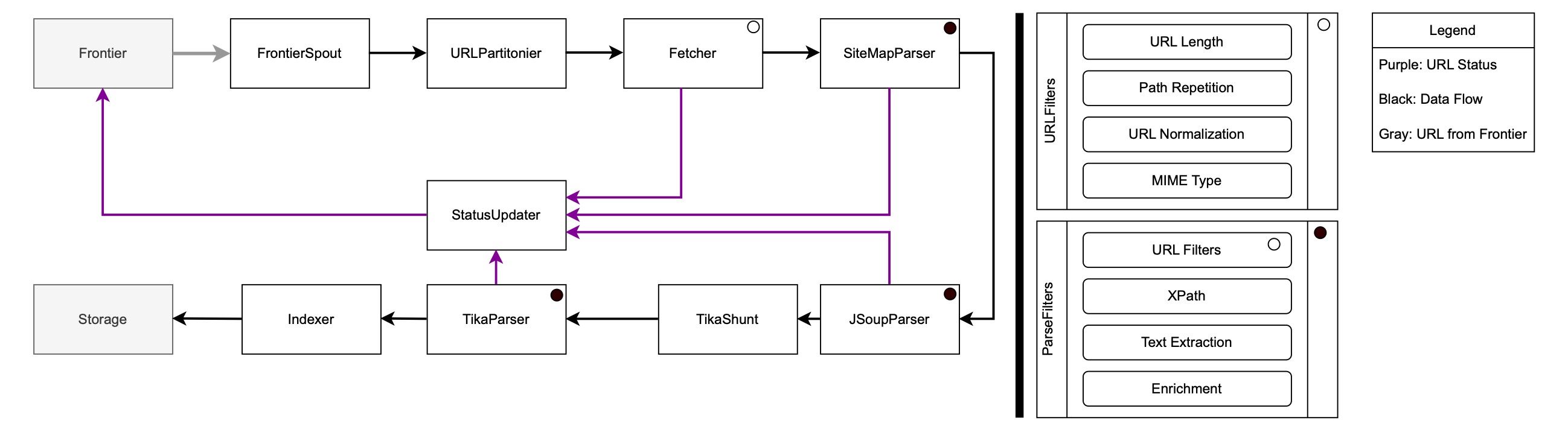
Figure 1 illustrates StormCrawler’s stream-processing crawl pipeline, built on Apache Storm. The architecture is intentionally modular and centers around two core abstractions:
-
The URL frontier: decides what to crawl and when
-
The parsing and indexing pipeline: decides what to extract, keep, and store
Black arrows show the main data flow, gray arrows represent URLs taken from the frontier, and purple arrows indicate URL status updates fed back to the frontier.
5.1.1. Crawl Flow and Core Components
The crawl begins with the Frontier, which is responsible for scheduling,
prioritization, politeness, and retry logic. URLs are emitted by a
Spout (e.g., AggregationSpout, SQLSpout) and partitioned by the URLPartitioner, typically using the
host as a key to enforce politeness constraints.
The Fetcher retrieves web resources and emits both the fetched content and
associated metadata such as HTTP status codes, headers, and MIME types. Based
on the content type, documents are routed to specialized parsers, including
SiteMapParser, JSoupParser for HTML content, and ParserBolt (Tika module) for binary
formats via Apache Tika.
Parsed content is then sent to the Indexer and persisted by the Storage
layer. Throughout the pipeline, fetch and parse outcomes are reported to the
StatusUpdater, which feeds URL status information back to the frontier,
closing the crawl feedback loop.
5.1.2. URL Filters
URL Filters determine whether a URL should be accepted, rejected, or modified before it is scheduled for fetching. They operate on seed URLs, discovered links, and redirect targets, ensuring that only crawl-worthy URLs enter the frontier.
In Figure 1, URL Filters are conceptually positioned between link discovery and the frontier. Their primary role is to control crawl scope and prevent frontier explosion.
Typical URL Filters include:
-
URL Length: rejects excessively long URLs that often indicate session IDs or crawler traps.
-
Path Repetition: detects repeating path segments that can lead to infinite crawl loops.
-
URL Normalization: canonicalizes URLs by removing fragments, sorting query parameters, or enforcing consistent schemes.
-
MIME Type: avoids scheduling URLs unlikely to yield useful content.
By applying these filters early, StormCrawler prevents unnecessary fetches and maintains an efficient, focused crawl.
5.1.3. Parse Filters
Parse Filters operate after content has been successfully fetched and parsed. They allow fine-grained control over how extracted data and outgoing links are processed.
Parse Filters are applied within the parsing bolts, following parsing by
SiteMapParser, JSoupParser, or ParserBolt (Tika). They can modify extracted text,
metadata, and links before the content is indexed or new URLs are emitted.
For HTML documents, JSoupParser and ParserBolt also apply JSoup Filters, which work
directly on the JSoup document.
Common Parse Filters include:
-
URL Filters (post-parse): further refine outgoing links extracted from content.
-
XPath: extract structured fields from HTML documents.
-
Text Extraction: control which parts of a document contribute to the indexed text.
-
Enrichment: add custom metadata such as language detection, entity tags, or domain-specific signals.
Parse Filters enable domain-specific logic without coupling it directly to the crawler’s core components.
5.1.4. Interaction Between URL Filters and Parse Filters
URL Filters focus on deciding what should be crawled, while Parse Filters focus on deciding what should be kept and how it should be interpreted.
6. Understanding StormCrawler’s Internals
6.1. Status Stream
The Apache StormCrawler components rely on two Apache Storm streams: the default one and another one called status.
The aim of the status stream is to pass information about URLs to a persistence layer. Typically, a bespoke bolt will take the tuples coming from the status stream and update the information about URLs in some sort of storage (e.g., OpenSearch, HBase, etc…), which is then used by a Spout to send new URLs down the topology.
This is critical for building recursive crawls (i.e., you discover new URLs and not just process known ones). The default stream is used for the URL being processed and is generally used at the end of the pipeline by an indexing bolt (which could also be OpenSearch, HBase, etc…), regardless of whether the crawler is recursive or not.
Tuples are emitted on the status stream by the parsing bolts for handling outlinks but also to notify that there has been a problem with a URL (e.g., unparsable content). It is also used by the fetching bolts to handle redirections, exceptions, and unsuccessful fetch status (e.g., HTTP code 400).
A bolt which sends tuples on the status stream declares its output in the following way:
declarer.declareStream(
    org.apache.stormcrawler.Constants.StatusStreamName,
    new Fields("url", "metadata", "status"));
As you can see for instance in SimpleFetcherBolt.
The Status enum has the following values:
-
DISCOVERED:: outlinks found by the parsers or "seed" URLs emitted into the topology by one of the spouts or "injected" into the storage. The URLs can be already known in the storage.
-
REDIRECTION:: set by the fetcher bolts.
-
FETCH_ERROR:: set by the fetcher bolts.
-
ERROR:: used by either the fetcher, parser, or indexer bolts.
-
FETCHED:: set by the indexer bolts, e.g. DummyIndexer (see below) or StdOutIndexer.
The difference between FETCH_ERROR and ERROR is that the former is possibly transient whereas the latter is terminal. The bolt which is in charge of updating the status (see below) can then decide when and whether to schedule a new fetch for a URL based on the status value.
Note that declaring the status stream in a component is only half the story: the topology must also connect that component to the StatusUpdaterBolt on Constants.StatusStreamName, otherwise its status tuples go nowhere. The querying spouts use this for URLs they refuse to emit (a scheme not in the protocols list is reported as ERROR so that the status updater marks the row ERROR and notifies the deletion stream, rather than re-querying it forever); the archetype crawler.flux files show the required wiring (a stream from the spout to the status bolt with streamId: "status"). Topologies built by hand must add the same connection when upgrading.
The DummyIndexer is useful for notifying the storage layer that a URL has been successfully processed, i.e., fetched, parsed, and anything else we want to do with the main content. It must be placed just before the StatusUpdaterBolt and sends a tuple for the URL on the status stream with a Status value of fetched.
The class AbstractStatusUpdaterBolt can be extended to handle status updates for a specific backend. It has an internal cache of URLs with a discovered status so that they don’t get added to the backend if they already exist, which is a simple but efficient optimisation. It also uses DefaultScheduler to compute a next fetch date and calls MetadataTransfer to filter the metadata that will be stored in the backend.
In most cases, the extending classes will just need to implement the method store(String URL, Status status, Metadata metadata, Date nextFetch) and handle their own initialisation in prepare(). You can find an example of a class which extends it in the StatusUpdaterBolt for OpenSearch.
6.1.1. AdaptiveScheduler
The AdaptiveScheduler extends the DefaultScheduler and adjusts the fetch interval based on whether a page has changed since the last fetch (detected via MD5 signature comparison). If the page changed, the interval shrinks toward a minimum; if unchanged, it grows toward a maximum. This avoids unnecessary re-fetches of static pages while keeping dynamic pages fresh.
Configuration example:
scheduler.class: "org.apache.stormcrawler.persistence.AdaptiveScheduler"
scheduler.adaptive.setLastModified: true
scheduler.adaptive.fetchInterval.min: 60
scheduler.adaptive.fetchInterval.max: 20160
scheduler.adaptive.fetchInterval.rate.incr: .5
scheduler.adaptive.fetchInterval.rate.decr: .5

metadata.persist:
  - signature
  - fetch.statusCode
  - fetchInterval
  - signatureChangeDate
  - last-modified
  - protocol.etag
The AdaptiveScheduler requires the MD5SignatureParseFilter to be configured so that the signature metadata field is populated. The scheduler also persists its current fetchInterval and the metadata used to detect content changes. The last-modified field (written when scheduler.adaptive.setLastModified is enabled) and protocol.etag allow conditional requests (If-Modified-Since / If-None-Match).
6.2. Bolts
6.2.1. Fetcher Bolts
There are actually two different bolts for fetching the content of URLs:
Both declare the same output:
declarer.declare(new Fields("url", "content", "metadata"));
declarer.declareStream(
        org.apache.stormcrawler.Constants.StatusStreamName,
        new Fields("url", "metadata", "status"));
with the status stream being used for handling redirections, restrictions by robots directives, or fetch errors, whereas the default stream gets the binary content returned by the server as well as the metadata to the following components (typically a parsing bolt).
A URL disallowed by robots.txt gets the status ERROR with the metadata error.cause: robots.txt.
Both use the same Protocols implementations and URLFilters to control the redirections.
The FetcherBolt has an internal set of queues where the incoming URLs are placed based on their hostname/domain/IP (see config fetcher.queue.mode) and a number of FetchingThreads (config fetcher.threads.number – 10 by default) which pull the URLs to fetch from the FetchQueues. When doing so, they make sure that a minimal amount of time (set with fetcher.server.delay – default 1 sec) has passed since the previous URL was fetched from the same queue. This mechanism ensures that we can control the rate at which requests are sent to the servers. A FetchQueue can also be used by more than one FetchingThread at a time (in which case fetcher.server.min.delay is used), based on the value of fetcher.threads.per.queue.
Incoming tuples spend very little time in the execute method of the FetcherBolt as they are put in the FetchQueues, which is why you’ll find that the value of Execute latency in the Storm UI is pretty low. They get acked later on, after they’ve been fetched. The metric to watch for in the Storm UI is Process latency.
The SimpleFetcherBolt does not do any of this, hence its name. It just fetches incoming tuples in its execute method and does not do multi-threading. It does enforce politeness by checking when a URL can be fetched and will wait until it is the case. It is up to the user to declare multiple instances of the bolt in the Topology class and to manage how the URLs get distributed across the instances of SimpleFetcherBolt, often with the help of the URLPartitioner.
6.3. Indexer Bolts
The purpose of crawlers is often to index web pages to make them searchable. The project contains resources for indexing with popular search solutions such as:
All of these extend the class AbstractIndexerBolt.
The core module also contains a simple indexer which dumps the documents into the standard output – useful for debugging – as well as a DummyIndexer.
The basic functionalities of filtering a document to index, mapping the metadata (which determines which metadata to keep for indexing and under what field name), or using the canonical tag (if any) are handled by the abstract class. This allows implementations to focus on communication with the indexing APIs.
Indexing is often the penultimate component in a pipeline and takes the output of a Parsing bolt on the standard stream. The output of the indexing bolts is on the status stream:
public void declareOutputFields(OutputFieldsDeclarer declarer) {
    declarer.declareStream(
            org.apache.stormcrawler.Constants.StatusStreamName,
            new Fields("url", "metadata", "status"));
}
The DummyIndexer is used for cases where no actual indexing is required. It simply generates a tuple on the status stream so that any StatusUpdater bolt knows that the URL was processed successfully and can update its status and scheduling in the corresponding backend.
You can easily build your own custom indexer to integrate with other storage systems, such as a vector database for semantic search, a graph database for network analysis, or any other specialized data store. By extending AbstractIndexerBolt, you only need to implement the logic to communicate with your target system, while StormCrawler handles the rest of the pipeline and status updates.
6.4. Parser Bolts
6.4.1. JSoupParserBolt
The JSoupParserBolt can be used to parse HTML documents and extract the outlinks, text, and metadata it contains. text/plain content is also handled: since there is no markup to parse, the content is used directly as the text and no outlinks are extracted. If you want to parse other non-HTML documents, use the Tika-based ParserBolt from the external modules.
This parser calls the URLFilters, JSoupFilters and ParseFilters defined in the configuration. Please note that it calls MetadataTransfer prior to calling the ParseFilters. If you create new Outlinks in your , you’ll need to make sure that you use MetadataTransfer there to inherit the Metadata from the parent document.
The JSoupParserBolt automatically identifies the charset of the documents. It uses the status stream to report parsing errors but also for the outlinks it extracts from a page. These would typically be used by an extension of AbstractStatusUpdaterBolt and persisted in some form of storage.
6.4.2. SiteMapParserBolt
StormCrawler can handle sitemap files thanks to the SiteMapParserBolt. This bolt should be placed before the standard ParserBolt in the topology, as illustrated in the crawler Flux topology.
The reason for this is that the SiteMapParserBolt acts as a filter: it passes on any incoming tuples to the default stream so that they get processed by the ParserBolt, unless the tuple contains isSitemap=true in its metadata, in which case the SiteMapParserBolt will parse it itself. Any outlinks found in the sitemap files are then emitted on the .
The SiteMapParserBolt applies any configured ParseFilters to the documents it parses and, just like its equivalent for HTML pages, it uses MetadataTransfer to populate the Metadata objects for the Outlinks it finds.
6.4.3. FeedParserBolt
The FeedParserBolt handles RSS and Atom feeds. Like the SiteMapParserBolt, it acts as a filter in the topology: it passes non-feed tuples through on the default stream, and only parses tuples whose metadata contains isFeed=true. Discovered feed entries are emitted on the status stream. The bolt is configured with feed.sniffContent (to auto-detect feeds) and feed.filter.hours.since.published (to discard old entries).
6.4.4. URLPartitionerBolt
The URLPartitionerBolt partitions incoming URLs by host, domain, or IP address (controlled by partition.url.mode). It is typically placed before a fetcher bolt to ensure that URLs destined for the same server are routed to the same bolt instance, enabling effective politeness enforcement. It uses the URLPartitioner utility internally.
6.4.5. StatusEmitterBolt
The StatusEmitterBolt is an abstract base class for bolts that emit tuples on both the default stream and the status stream. It provides utility methods for emitting status updates (e.g., errors, redirections, discovered URLs). The fetcher and parser bolts (FetcherBolt, SimpleFetcherBolt, JSoupParserBolt, SiteMapParserBolt, FeedParserBolt) all extend this class.
6.5. Spouts
StormCrawler provides several spout implementations for feeding URLs into the topology:
6.5.1. FileSpout
The FileSpout reads seed URLs from UTF-8 text files and loads them into memory. Each line is parsed using StringTabScheme into a URL and optional metadata (tab-separated). This is useful for one-off crawls with a known list of URLs.
6.5.2. MemorySpout
The MemorySpout stores URLs in an in-memory priority queue. It is intended for testing and debugging in local mode or with a single worker. It can be used with MemoryStatusUpdater to emulate a recursive crawl without an external storage backend.
6.5.3. AbstractQueryingSpout
The AbstractQueryingSpout is the abstract base class for spouts that query a storage backend for URLs to fetch. External module spouts such as AggregationSpout (OpenSearch), SolrSpout, SQLSpout, and the URLFrontier Spout all extend this class. It handles throttling, acking, and coordination with the URL buffer (urlbuffer.class).
6.6. Filters
6.6.1. Parse Filters
ParseFilters are called from parsing bolts such as JSoupParserBolt and SiteMapParserBolt to extract data from web pages. The extracted data is stored in the Metadata object. ParseFilters can also modify the Outlinks and, in that sense, act as URLFilters.
ParseFilters need to implement the interface ParseFilter, which defines two methods:
public void filter(String URL, byte[] content, ParseResult parse);

public void configure(Map stormConf, JsonNode filterParams);-
The
filtermethod is where the extraction occurs. ParseResult objects contain the outlinks extracted from the document as well as a Map of String to ParseData, where the String is the URL of a subdocument or the main document itself. ParseData objects contain Metadata, binary content, and text for the subdocuments, which is useful for indexing subdocuments independently of the main document. Use ParseResult.getOrCreate(URL) to add data for a URL and ParseResult.getIfPresent(URL) for a read-only lookup. Note that the parsing bolts skip entries which carry no content, no text and no metadata, except for the URL being parsed, so a sub-document should always set at least one of the three to be emitted. -
The
configuremethod takes a JSON object loaded by the wrapper class ParseFilters. The Storm configuration map can also be used to configure the filters, as described in Configuration.
The archetype includes a default JSON configuration file for ParseFilters. The configuration allows multiple instances of the same filter class with different parameters and supports complex parameter objects. ParseFilters are executed in the order they appear in the JSON file.
Provided ParseFilters
-
CollectionTagger – CollectionTagger assigns one or more tags to the metadata of a document based on URL patterns defined in a JSON resource file. The resource file supports both include and exclude regular expressions:
{
  "collections": [
    {
      "name": "stormcrawler",
      "includePatterns": ["https://stormcrawler.net/.+"]
    },
    {
      "name": "crawler",
      "includePatterns": [".+crawler.+", ".+nutch.+"],
      "excludePatterns": [".+baby.+", ".+spider.+"]
    }
  ]
}-
CommaSeparatedToMultivaluedMetadata – CommaSeparatedToMultivaluedMetadata rewrites single metadata values containing comma-separated entries into multiple values for the same key, useful for keyword tags. The number of values produced from a single entry is bounded by the optional
maxTokensparameter (128 by default), so that a page cannot generate an unbounded amount of metadata. -
DomainParseFilter – DomainParseFilter stores the domain or host name in the metadata for later indexing.
-
MD5SignatureParseFilter – MD5SignatureParseFilter generates an MD5 signature of a document based on the binary content, text, or URL (as a last resort). It can be combined with content filtering to exclude boilerplate text.
-
MimeTypeNormalization – MimeTypeNormalization converts server-reported or inferred mime-type values into human-readable values such as pdf, html, or image and stores them in the metadata, useful for indexing and filtering search results.
Extracting data from the markup of a document, e.g. with XPath expressions or from JSON-LD, is done with JSoupFilters.
You can also implement custom ParseFilters to extend the capabilities of the parsing pipeline. For example, you might create a filter to enrich a document’s metadata with additional information, such as language detection, sentiment analysis, named entity recognition, or custom tags extracted from the content. Custom filters can also modify or remove outlinks, normalize text, or integrate external data sources, allowing you to tailor the crawler to your specific processing or indexing requirements. By implementing the ParseFilter interface and configuring the filter in the JSON file, your custom logic will be seamlessly executed within the parsing bolt.
6.6.2. JSoup Filters
JSoupFilters are called by the JSoupParserBolt and by the Tika-based ParserBolt. Unlike ParseFilters, they get the document produced by JSoup, which makes them the option to use for extracting data from the markup of a document. They are called before the ParseFilters, which can therefore use the metadata and outlinks generated by the JSoupFilters.
JSoupFilters need to implement the interface JSoupFilter:
public void filter(String url, byte[] content, org.jsoup.nodes.Document doc, ParseResult parse);

public void configure(Map stormConf, JsonNode filterParams);
The filter method has the same role as for the ParseFilters (see above) but also gets the JSoup document. The configure method takes the JSON object loaded by the wrapper class JSoupFilters.
The JSoupFilters are defined in a JSON file whose location is set with jsoup.filters.config.file; no JSoupFilters are used if this is not set. The archetype includes a default jsoupfilters.json:
{
  "org.apache.stormcrawler.parse.JSoupFilters": [
    {
      "class": "org.apache.stormcrawler.jsoup.XPathFilter",
      "name": "XPathFilter",
      "params": {
        "canonical": "//*[@rel=\"canonical\"]/@href",
        "parse.description": [
          "//*[@name=\"description\"]/@content",
          "//*[@name=\"Description\"]/@content"
        ],
        "parse.title": [
          "//TITLE/allText()",
          "//META[@name=\"title\"]/@content"
        ],
        "parse.keywords": "//META[@name=\"keywords\"]/@content"
      }
    },
    {
      "class": "org.apache.stormcrawler.jsoup.LinkParseFilter",
      "name": "LinkParseFilter",
      "params": {
        "pattern": "//FRAME/@src"
      }
    }
  ]
}
JSoupFilters are executed in the order they appear in the JSON file.
Provided JSoupFilters
-
XPathFilter – XPathFilter extracts data using XPath expressions and stores the values in the Metadata object, under the key used in the configuration. A key can have several expressions; they are tried in order and the values of the first one returning a result are kept. By default, the text of the matching elements is used; an expression can end with
/@attributeto get the value of an attribute,/html()to get the inner HTML of the elements, or/tidyText()and/allText()for their text. Element names are lowercased, so//TITLEand//titleare equivalent. -
LinkParseFilter – LinkParseFilter extracts additional outlinks with XPath expressions, using the same syntax as the XPathFilter, e.g.
//IMG/@src. The URLs are resolved against the URL of the page, filtered with the URLFilters and get their metadata from MetadataTransfer, like the outlinks extracted by the parser. -
LDJsonParseFilter – LDJsonParseFilter extracts data from the first JSON-LD script of a page. The parameters map metadata keys to JSON Pointer expressions, e.g.
"streetAddress": "/location/streetAddress".
6.6.3. URL Filters
The URL filters can be used to both remove or modify incoming URLs (unlike Nutch where these functionalities are separated between URLFilters and URLNormalizers). This is generally used within a parsing bolt to normalize and filter outgoing URLs, but is also called within the FetcherBolt to handle redirections.
URLFilters need to implement the interface URLFilter which defines a single method:
public String filter(URL sourceUrl, Metadata sourceMetadata,
            String urlToFilter);
and inherits a default one from Configurable:
public void configure(Map stormConf, JsonNode jsonNode);The configuration is done via a JSON file which is loaded by the wrapper class URLFilters. The URLFilter instances can be used directly, but it is easier to use the class URLFilters instead. Some filter implementations can also be configured with the standard configuration mechanism.
Here is an example of a JSON configuration file.
The JSON configuration allows loading several instances of the same filtering class with different parameters and can handle complex configuration objects since it makes no assumptions about the content of the field param. The URLFilters are executed in the order in which they are defined in the JSON file.
Built-in URL Filters
Basic
The BasicURLFilter filters based on the length of the URL and the repetition of path elements.
The BasicURLNormalizer removes the anchor part of URLs based on the value of the parameter removeAnchorPart. It also removes query elements based on the configuration and whether their value corresponds to a 32-bit hash.
FastURLFilter
The FastURLFilter is based on regex patterns and organized by scope (host | domain | metadata | global). For a given URL, the scopes are tried in the order given above and the URL is kept or removed based on the first matching rule. The default policy is to accept a URL if no match is found.
The resource file is in JSON and looks like this:
[{
    "scope": "GLOBAL",
    "patterns": [
        "DenyPathQuery \\.jpg"
    ]
  },
  {
    "scope": "domain:stormcrawler.net",
    "patterns": [
        "AllowPath /digitalpebble/",
        "DenyPath .+"
    ]
  },
  {
    "scope": "metadata:key=value",
    "patterns": [
       "DenyPath .+"
    ]
}]
DenyPathQuery indicates that the pattern should be applied on the path URL path and the query element, whereas DenyPath means the path alone.
Host
The HostURLFilter filters URLs based on whether they belong to the same host or domain name as the source URL. This is configured with the parameters ignoreOutsideDomain and ignoreOutsideHost. The latter takes precedence over the former.
MaxDepth
The MaxDepthFilter is configured with the parameter maxDepth and requires metadata.track.depth to be set to true in the Configuration. This removes outlinks found too far from the seed URL and controls the expansion of the crawl.
If the filter is configured with a value of 0, all outlinks will be removed, regardless of whether the depth is being tracked.
The max depth can also be set on a per-seed basis using the key/value max.depth, which is automatically transferred to the outlinks if metadata.track.depth is set to true.
Metadata
The MetadataFilter filters URLs based on metadata in the source document.
RegexURLFilter
The RegexURLFilter uses a configuration file or a JSON ArrayNode containing regular expressions to determine whether a URL should be kept or not. The most specific rule must be placed first as a URL is kept or removed based on the first matching rule.
{
    "urlFilters": [
        "-^(file|ftp|mailto):",
        "+."
    ]
}
RegexURLNormalizer
The RegexURLNormalizer uses a configuration file or a JSON ArrayNode containing regular expressions and replacements to normalize URLs.
{
    "urlNormalizers": [
        {
            "pattern": "#.*?(\\?|&|$)",
            "substitution": "$1"
        },
        {
            "pattern": "\\?&",
            "substitution": "\\?"
        }
    ]
}
RobotsFilter
The RobotsFilter discards URLs based on the robots.txt directives. This is meant for small, limited crawls where the number of hosts is finite. Using this on a larger or open crawl would impact performance as the filter tries to retrieve the robots.txt files for any host found.
SelfURLFilter
The SelfURLFilter removes self-referential URLs, i.e., outlinks that point back to the same page they were discovered on (after normalization).
SitemapFilter
The SitemapFilter discards the outlinks of URLs which are not sitemaps when sitemaps have been found.
6.7. Metadata Transfer
The class MetadataTransfer is an important part of the framework and is used in key parts of a pipeline.
-
Fetching
-
Parsing
-
Updating bolts
An instance (or extension) of MetadataTransfer gets created and configured with the method public static MetadataTransfer getInstance(Map<String, Object> conf) which takes the standard Apache Storm configuration as a parameter.
A MetadataTransfer instance has mainly two methods, both returning Metadata objects :
-
getMetaForOutlink(String targetUrl, String sourceUrl, Metadata parentMetadata) -
filter(Metadata metadata)
The former is used when creating Outlinks i.e. in the parsing bolts but also for handling redirections in the FetcherBolt(s) The latter is used by extensions of the AbstractStatusUpdaterBolt class to determine which Metadata should be persisted.
The behavior of the default MetadataTransfer class is driven by configuration only. It has the following options.
-
metadata.transferlist of metadata key values to filter or transfer to the outlinks. See crawler-default.yaml -
metadata.persistlist of metadata key values to persist in the status storage. See crawler-default.yaml -
metadata.track.pathwhether to track the URL path or not. Boolean value, true by default. -
metadata.track.depthwhether to track the depth from seed. Boolean value, true by default.
Note that the method getMetaForOutlink calls filter to determine what key values to keep.
6.8. Protocols
StormCrawler supports multiple network protocols for fetching content from various sources on the web. Each protocol implementation defines how the crawler connects to a resource, sends requests, and handles responses such as status codes, headers, and content streams.
Protocols are a key part of the fetching process and are used by StormCrawler’s bolts to retrieve data from remote servers.
While HTTP and HTTPS are the most commonly used, other protocols like file: are also supported for local or distributed filesystem access.
Use these configurations to fine-tune fetching performance, authentication, connection handling, and protocol-level optimizations across your crawler topology.
6.8.1. Following Redirects
When handling HTTP redirects, StormCrawler offers three modes:
-
Default behavior (
redirections.allowed: true,http.allow.redirects: false): The redirect target URL is emitted to the status stream. URL filter and normalization rules are applied to the target URL, the crawler verifies that the target URL is allowed perrobots.txt, and it is ensured that the redirect target is not fetched multiple times (URLs are deduplicated in the status index). -
Redirects disabled (
redirections.allowed: false): Redirect target URLs are not sent to the status stream. Redirects are effectively ignored. -
Immediate follow (
http.allow.redirects: true): Redirects are followed immediately by the protocol and the target URLs are not emitted to the status stream. This is the default behavior for the browser-based Playwright protocol, but it is also supported by the OkHttp protocol. With immediate follows on OkHttp, every redirect target runs through the URL filter chain before the hop is taken and a rejected target ends the chain, so the filter rules configured for the crawl still apply to the hops. The chain is limited tohttp.allow.redirects.maxhops (default 5); a chain which does not end within that returns its last redirect response, which the caller handles like it does when immediate follows are off. The final URL is recorded in the response metadata under_redirectedTo. Deduplication androbots.txtchecks do not apply to the followed hops.
6.8.2. Network Protocols
The following network protocols are implemented in StormCrawler:
File
DelegatorProtocol
The DelegatorProtocol enables selection from a collection of sub-protocols using filters based on metadata and URL patterns. The last protocol in the list acts as the default. This is useful when certain URLs need to be fetched with a browser-based protocol (e.g., Playwright) while the majority use a standard HTTP client.
http.protocol.implementation: "org.apache.stormcrawler.protocol.DelegatorProtocol"
protocol.delegator.config:
  - className: "org.apache.stormcrawler.protocol.playwright.HttpProtocol"
    filters:
      domain: "example.com"
  - className: "org.apache.stormcrawler.protocol.okhttp.HttpProtocol"
The protocols are tried in order; the first matching filter wins. Filters can match on metadata keys, domain names, or URL regex patterns.
HTTP/S
See Metadata-dependent Behavior For HTTP Protocols for the effect of metadata content on protocol behaviour.
To change the implementation, add the following lines to your custom configuration YAML file:
http.protocol.implementation: "org.apache.stormcrawler.protocol.okhttp.HttpProtocol"
https.protocol.implementation: "org.apache.stormcrawler.protocol.okhttp.HttpProtocol"-
Playwright (browser-based, in the
playwrightexternal module)
6.8.3. Feature grid
| Features | OKHttp |
|---|---|
Basic authentication |
|
Proxy (w. credentials?) |
Y / Y |
Interruptible / trimmable #463 |
Y / Y |
Cookies |
|
Response headers |
Y |
Trust all certificates |
|
HEAD method |
|
POST method |
|
Verbatim response header |
|
Verbatim request header |
|
IP address capture |
|
Navigation and javascript |
N |
HTTP/2 |
Y |
Configurable connection pool |
The OKHttp client does not execute JavaScript: use the browser-based Playwright protocol for pages that require rendering or navigation.
6.8.4. HTTP/2
-
The OKHttp protocol supports HTTP/2 if the JDK includes ALPN (Java 9 and upwards or Java 8 builds starting early/mid 2020).
-
Playwright: whether HTTP/2 is used or not depends on the browser.
Since #829, the HTTP protocol version used is configurable via http.protocol.versions (see also comments in crawler-default.yaml).
For example, to force that only HTTP/1.1 is used:
http.protocol.versions:
- "http/1.1"
6.8.5. Metadata-dependent Behavior For HTTP Protocols
The metadata argument to HTTPProtocol.getProtocolOutput() can affect the behavior of the protocol. The following metadata keys are detected by HTTPProtocol implementations and utilized in performing the request:
-
last-modified: If this key is present inmetadata, the protocol will use the metadata value as the date for theIf-Modified-Sinceheader field of the HTTP request. If the key is not present, theIf-Modified-Sincefield won’t be added to the request header. -
protocol.etag: If this key is present inmetadata, the protocol will use the metadata value as the ETag for theIf-None-Matchheader field of the HTTP request. If the key is not present, theIf-None-Matchfield won’t be added to the request header. -
http.accept: If this key is present inmetadata, the protocol will use the value to override the value for theAcceptheader field of the HTTP request. If the key is not present, thehttp.acceptglobal configuration value is used instead. (Available in v1.11+) -
http.accept.language: If this key is present inmetadata, the protocol will use the value to override the value for theAccept-Languageheader field of the HTTP request. If the key is not present, thehttp.accept.languageglobal configuration value is used instead. (Available in v1.11+) -
protocol.set-cookie: If this key is present inmetadataandhttp.use.cookiesis true, the protocol sends the cookies stored from the response this page was linked to, given the cookie applies to the url being fetched. A cookie without aDomainattribute is only sent when the url has the same host as the response which set it, which requiresprotocol.set-cookie-originto be present too. -
protocol.set-cookie-origin: Written by the protocol next toprotocol.set-cookiewhen a response carries aSet-Cookieheader, and holds the url of that response. It must be transferred and persisted together withprotocol.set-cookie, otherwise cookies without aDomainattribute are not sent. A value sent by a server as a header of that name is discarded. -
http.method.head: If this key is present inmetadata, the protocol sends a HEAD request. (see #923) -
http.post.json: If this key is present inmetadata, the protocol sends a POST request. (Available in v1.12+ only for okhttp, see #641) -
protocol.set-headers: If this key is present in metadata, the protocol adds the specified headers to the request. See #993 -
http.proxy.skip: If this key is set totrueinmetadata, the built-in proxy managers return no proxy for the request, even when a default proxy, proxy rotation, or metadata proxy override is configured. If present, the value must betrueorfalse. -
http.proxy: If this key is present inmetadata, the built-in proxy managers use it as a full proxy connection string for the request, e.g.http://user:pass@proxy.example.com:8080. It takes precedence over component proxy metadata keys. Invalid values throwIllegalArgumentException. -
http.proxy.host,http.proxy.port,http.proxy.type,http.proxy.user,http.proxy.pass: If these keys are present inmetadata, the built-in proxy managers build a per-request proxy from the component values. These metadata keys use the same names and defaults as the proxy configuration keys, except blankhttp.proxy.userandhttp.proxy.passvalues are treated as unset, and non-blank authentication values must be supplied together. Component metadata values are trimmed. Thehttp.proxy.portvalue must be an integer from1through65535. Use the component keys for credentials containing URL-reserved separator characters such as:or@; those characters are preserved in component values, while fullhttp.proxyvalues are parsed as SCProxy connection strings. Invalid values throwIllegalArgumentException.
Example:
"protocol%2Eset-header": [
  "header1=value1",
  "header2=value2"
]
Notes:
-
Metadata values starting with
protocol.may start with a different prefix instead. Seeprotocol.md.prefixand #776. -
Metadata used for requests needs to be persisted. For example:
metadata.persist:
  - last-modified
  - protocol.etag
  - protocol.set-cookie
  - protocol.set-cookie-origin
- ...-
Cookies and the host which set them need to be transferred to outlinks by setting:
metadata.transfer:
  - protocol.set-cookie
  - protocol.set-cookie-origin
The wildcard protocol.set-cookie* covers both keys.
7. Configuration
7.1. User Agent Configuration
Crawlers should always act responsibly and ethically when accessing websites. A key aspect of this is properly identifying themselves through the User-Agent header. By providing a clear and accurate user agent string, webmasters can understand who is visiting their site and why, and can apply rules in robots.txt accordingly. Respecting these rules, avoiding excessive request rates, and honoring content restrictions not only ensures legal compliance but also maintains a healthy relationship with the web community.
Transparent identification is a fundamental part of ethical web crawling.
The configuration of the user agent in StormCrawler has two purposes:
-
Identification of the crawler for webmasters
-
Selection of rules from robots.txt
7.1.1. Crawler Identification
The politeness of a web crawler is not limited to how frequently it fetches pages from a site, but also in how it identifies itself to sites it crawls. This is done by setting the HTTP header User-Agent, just like your web browser does.
The full user agent string is built from the concatenation of the configuration elements:
-
http.agent.name: name of your crawler -
http.agent.version: version of your crawler -
http.agent.description: description of what it does -
http.agent.url: URL webmasters can go to to learn about it -
http.agent.email: an email so that they can get in touch with you
Only http.agent.name is required. Empty elements are left out of the string, which has the form name/version (description; url; email).
StormCrawler has not provided default values for these since version 2.11.
You can specify the user agent verbatim with the config http.agent but you will still need to provide a http.agent.name for parsing robots.txt files.
7.1.2. Robots Exclusion Protocol
This is also known as the robots.txt protocol, it is formalised in RFC 9309. Part of what the robots directives do is to define rules to specify which parts of a website (if any) are allowed to be crawled. The rules are organised by User-Agent, with a * to match any agent not otherwise specified explicitly, e.g.:
User-Agent: *
Disallow: *.gif$
Disallow: /example/
Allow: /publications/
In the example above the rule allows access to the URLs with the /publications/ path prefix, and it restricts access to the URLs with the /example/ path prefix and to all URLs with a .gif suffix. The "*" character designates any character, including the otherwise-required forward slash.
The value of http.agent.name is what StormCrawler looks for in the robots.txt. It MUST contain only uppercase and lowercase letters ("a-z" and "A-Z"), underscores ("_"), and hyphens ("-").
Unless you are running a well known web crawler, it is unlikely that its agent name will be listed explicitly in the robots.txt (if it is, well, congratulations!). While you want the agent name value to reflect who your crawler is, you might want to follow rules set for better known crawlers. For instance, if you were a responsible AI company crawling the web to build a dataset to train LLMs, you would want to follow the rules set for Google-Extended (see list of Google crawlers) if any were found.
This is what the configuration http.robots.agents allows you to do. It is a comma-separated string but can also take a list of values. By setting it alongside http.agent.name (which should also be the first value it contains), you are able to broaden the match rules based on the identity as well as the purpose of your crawler.
7.2. Proxy
StormCrawler’s proxy system is built on top of the SCProxy class and the ProxyManager interface. Every proxy used in the system is formatted as a SCProxy. The ProxyManager implementations handle the management and delegation of their internal proxies. At the call of Protocol#getProtocolOutput(), the ProxyManager.getProxy() is called to retrieve a proxy for the individual request.
The ProxyManager interface can be implemented in a custom class to create custom logic for proxy management and load balancing. When http.proxy.manager is omitted, the core HTTP protocol implementations create SingleProxyManager only if http.proxy.host is configured. To use SingleProxyManager with only a full http.proxy connection string, or to use MultiProxyManager or custom implementations, pass the class path and name via the config parameter http.proxy.manager:
http.proxy.manager: "org.apache.stormcrawler.proxy.MultiProxyManager"
StormCrawler implements two ProxyManager classes by default:
-
SingleProxyManager Manages a single proxy passed by the backwards compatible proxy fields in the configuration:
----
http.proxy
http.proxy.host
http.proxy.port
http.proxy.type
http.proxy.user (optional)
http.proxy.pass (optional)
----
-
MultiProxyManager Manages multiple proxies passed through a TXT file. The file should contain connection strings for all proxies including the protocol and authentication (if needed). The file supports comment lines (
//or#) and empty lines. The file path should be passed via the config at the below field. The TXT file must be available to all nodes participating in the topology:---- http.proxy.file ----
The MultiProxyManager load balances across proxies using one of the following schemes. The load balancing scheme can be passed via the config using http.proxy.rotation; the default value is ROUND_ROBIN:
-
ROUND_ROBIN Evenly distributes load across all proxies
-
RANDOM Randomly selects proxies using the native Java random number generator. RNG is seeded with the nanos at instantiation
-
LEAST_USED Selects the proxy with the least amount of usage. This is performed lazily for speed and therefore will not account for changes to usages during the selection process. If no custom implementations are made this should theoretically operate the same as ROUND_ROBIN
The SCProxy class contains all of the information associated with proxy connection. In addition, it tracks the total usage of the proxy and optionally tracks the location of the proxy IP. Usage information is used for the LEAST_USED load balancing scheme. The location information is currently unused but left to enable custom implementations the ability to select proxies by location.
The built-in proxy managers also support per-URL proxy selection from metadata. Metadata is checked before configured defaults or rotation. Set http.proxy.skip to true in a URL’s metadata to fetch that URL without a proxy; this takes precedence over both metadata overrides and configured proxies. To override the proxy, either set http.proxy to a full proxy connection string such as http://user:pass@proxy.example.com:8080, or use the same component keys as the configuration: http.proxy.host, http.proxy.port, http.proxy.type, http.proxy.user, and http.proxy.pass. When both forms are present, the full http.proxy connection string takes precedence over component keys. Component metadata values are trimmed, blank host, type, and port values are rejected, and component http.proxy.port must be an integer from 1 through 65535. Invalid metadata proxy values throw IllegalArgumentException instead of falling back to the configured proxy.
When credentials contain URL-reserved separator characters such as : or @, prefer the component keys (http.proxy.user and http.proxy.pass) so the values are passed as fields. Component key values preserve those separator characters but trim leading and trailing whitespace. Full http.proxy connection strings and http.proxy.file entries are parsed as SCProxy connection strings.
Metadata component authentication is fail-fast: blank http.proxy.user and http.proxy.pass values are treated as unset, but if either non-blank value is set, both must be non-blank. Configured SingleProxyManager component authentication is more permissive for backwards compatibility and uses unauthenticated proxying unless both configured values are non-empty.
With SingleProxyManager, explicitly configuring http.proxy.manager without a default proxy is valid. URLs with proxy metadata use the metadata proxy, and URLs without proxy metadata return no proxy.
With MultiProxyManager, a metadata proxy matching one of the configured proxies reuses the configured SCProxy instance so usage accounting remains meaningful. Metadata proxies outside the configured rotation are allowed and are used only for that request.
7.3. Metadata
7.3.1. Registering Metadata for Kryo Serialization
If your Apache StormCrawler topology doesn’t extend org.apache.stormcrawler.ConfigurableTopology, you will need to manually register StormCrawler’s Metadata class for serialization in Storm. For more information on Kryo serialization in Apache Storm, you can refer to the documentation.
To register Metadata for serialization, you’ll need to import org.apache.storm.Config and org.apache.stormcrawler.Metadata. Then, in your topology class, you’ll register the class with:
Config.registerSerialization(conf, Metadata.class);where conf is your Storm configuration for the topology.
Alternatively, you can specify in the configuration file:
topology.kryo.register:
  - org.apache.stormcrawler.Metadata
7.3.2. MetadataTransfer
The class MetadataTransfer is an important part of the framework and is used in key parts of a pipeline:
-
Fetching
-
Parsing
-
Updating bolts
An instance (or extension) of MetadataTransfer gets created and configured with the method:
public static MetadataTransfer getInstance(Map<String, Object> conf)A MetadataTransfer instance has mainly two methods, both returning Metadata objects:
-
getMetaForOutlink(String targetURL, String sourceURL, Metadata parentMD) -
filter(Metadata metadata)
The former is used when creating Outlinks, i.e., in the parsing bolts but also for handling redirections in the [[FetcherBolt(s)]].
The latter is used by extensions of the AbstractStatusUpdaterBolt class to determine which Metadata should be persisted.
The behavior of the default MetadataTransfer class is driven by configuration only. It has the following options:
-
metadata.transfer:: list of metadata key values to filter or transfer to the outlinks. Please see the corresponding comments in crawler-default.yaml -
metadata.persist:: list of metadata key values to persist in the status storage. Please see the corresponding comments in crawler-default.yaml -
metadata.track.path:: whether to track the URL path or not. Boolean value, true by default. -
metadata.track.depth:: whether to track the depth from seed. Boolean value, true by default.
Note that the method getMetaForOutlink calls filter to determine which key values to keep.
7.4. Configuration Options
The following tables describe all available configuration options and their default values. If one of the keys is not present in your YAML file, the default value will be taken.
Note: Some configuration options may not be applicable depending on the specific components and features you are using in your Apache StormCrawler topology. Some external modules might define additional options not listed here.
7.4.1. Fetching and Partitioning
| key | default value | description |
|---|---|---|
fetcher.max.crawl.delay |
30 |
Maximum accepted Crawl-delay from robots.txt (seconds). If the crawl-delay exceeds this value the behavior depends on the value of fetcher.max.crawl.delay.force. |
fetcher.max.crawl.delay.force |
false |
Configures the behavior of fetcher if the robots.txt crawl-delay exceeds fetcher.max.crawl.delay. If false: the tuple is emitted to the StatusStream
as an ERROR. If true: the fetcher caps its local delay and emits the requested delay in whole seconds as |
fetcher.max.queue.size |
-1 |
The maximum length of the queue used to store items to be fetched by the FetcherBolt. A setting of -1 sets the length to Integer.MAX_VALUE. |
fetcher.max.throttle.sleep |
-1 |
The maximum amount of time to wait between fetches; if exceeded, the item is sent to the back of the queue. Used in SimpleFetcherBolt. -1 disables it. |
fetcher.max.urls.in.queues |
-1 |
Maximum number of URLs held by the FetcherBolt: URLs being fetched plus URLs waiting in all its queues. The bolt stops taking tuples while the limit is reached. -1 disables the limit. |
fetcher.maxThreads.host/domain/ip |
fetcher.threads.per.queue |
Overwrites fetcher.threads.per.queue. Useful for crawling some domains/hosts/IPs more intensively. |
fetcher.metrics.time.bucket.secs |
10 |
Metrics events emitted every value seconds to the system stream. |
fetcher.queue.mode |
byHost |
Possible values: byHost, byDomain, byIP. Determines queue grouping. |
fetcher.server.delay |
1 |
Delay between crawls in the same queue if no Crawl-delay is defined. |
fetcher.server.delay.force |
false |
Defines fetcher behavior when the robots.txt crawl-delay is smaller than fetcher.server.delay. |
fetcher.server.min.delay |
0 |
Delay between crawls for queues with >1 thread. Ignores robots.txt. |
fetcher.threads.number |
10 |
Total concurrent threads fetching pages. Adjust carefully based on system capacity. |
fetcher.threads.per.queue |
1 |
Default number of threads per queue. Can be overridden. |
fetcher.threads.start.delay |
10 |
Delay (milliseconds) between starting next fetcher thread. Avoids overloading DNS or network resources during fetcher startup when all threads simultaneously start requesting pages. |
fetcher.timeout.queue |
-1 |
Maximum time (seconds) a URL can wait in the queue, checked after robots.txt processing. A URL which waited longer is acked without being fetched and without a status update for that URL, and the |
fetcher.thread.timeout |
-1 |
Hard deadline (seconds) for each protocol call made for a URL, independent of the protocol’s own socket timeouts: the robots.txt lookup, each redirect it follows (up to 5, each a call of its own), and the page fetch, whose redirect chain shares a single deadline. Worst case for one URL is therefore several times the value. -1 disables it. The deadline never exceeds |
fetcher.thread.timeout.helpers |
2 x fetcher.threads.number (2 for SimpleFetcherBolt) |
Maximum number of helper threads per bolt instance for the abandoned fetches above. Threads are created on demand and released after a minute idle. When every helper is busy the URL never reaches the network: it is acked without a status, like a URL which waited too long in the queue, so that the spout retries it later, and the |
fetcherbolt.queue.debug.filepath |
"" |
Path of a trigger file on the worker, |
http.agent.description |
- |
Description for the User-Agent header. |
http.agent.email |
- |
Email address in User-Agent header. |
http.agent.name |
- |
Name in User-Agent header. |
http.agent.url |
- |
URL in User-Agent header. |
http.agent.version |
- |
Version in User-Agent header. |
http.basicauth.hosts |
- |
Hosts the Basic Authentication credentials of |
http.basicauth.password |
- |
Password for http.basicauth.user. |
http.basicauth.user |
- |
Username for Basic Authentication. Only sent to the hosts listed in |
http.content.limit |
-1 |
Maximum HTTP response body size (bytes). Default: no limit. |
http.protocol.implementation |
org.apache.stormcrawler.protocol.okhttp.HttpProtocol |
HTTP Protocol implementation. |
http.proxy |
- |
Full SCProxy connection string read by SingleProxyManager when that manager is selected, e.g. |
http.proxy.file |
- |
Proxy connection-string file read by MultiProxyManager when that manager is selected. |
http.proxy.host |
- |
SingleProxyManager component proxy host. |
http.proxy.manager |
- |
ProxyManager implementation class. If omitted, the core HTTP protocols create SingleProxyManager only when |
http.proxy.pass |
- |
SingleProxyManager component proxy password, used with |
http.proxy.port |
8080 |
SingleProxyManager component proxy port. Must be from 1 through 65535. |
http.proxy.rotation |
ROUND_ROBIN |
MultiProxyManager proxy rotation scheme when that manager is selected. |
http.proxy.type |
HTTP |
SingleProxyManager component proxy type. |
http.proxy.user |
- |
SingleProxyManager component proxy username, used with |
http.retry.on.connection.failure |
true |
(OkHttp only) Retry fetching on connection failure. See OkHttp docs. |
http.robots.403.allow |
true |
Allow crawling when robots.txt returns HTTP 403. |
http.robots.5xx.allow |
false |
Allow crawling when robots.txt returns a server error (5xx). |
http.robots.agents |
'' |
Additional user-agent strings for interpreting robots.txt. |
http.robots.content.limit |
524288 |
Maximum bytes to fetch for robots.txt. May be larger than |
http.robots.file.skip |
false |
Ignore robots.txt rules entirely. |
http.robots.headers.skip |
false |
Ignore robots directives from HTTP headers. |
http.robots.meta.skip |
false |
Ignore robots directives from HTML meta tags. |
http.robots.redirect.crossorigin.allow |
false |
Follow a robots.txt redirect pointing at a different scheme, host or port than the URL it was reached from. Redirects to schemes other than http and https are never followed. A redirect which only replaces http with https while staying on the same host and port is always followed, whatever this is set to. When enabled, the robots.txt is re-fetched from the host named in the |
http.robots.redirect.refused.allow |
false |
Allow crawling when a robots.txt redirect was not followed because of |
robots.noFollow.strict |
true |
If true, remove all outlinks from pages marked as noFollow. |
http.store.headers |
false |
Whether to store response headers. |
http.timeout |
10000 |
Connection timeout (ms). |
http.use.cookies |
false |
Use cookies in subsequent requests. Requires |
https.protocol.implementation |
org.apache.stormcrawler.protocol.okhttp.HttpProtocol |
HTTPS Protocol implementation. |
partition.url.mode |
byHost |
Defines how URLs are partitioned: byHost, byDomain, or byIP. |
protocols |
http,https |
Supported protocols. The |
redirections.allowed |
true |
If true, emit redirect target URLs as "outlinks" to the status stream. If false, do not follow redirects. See also |
http.allow.redirects |
false |
(OkHttp only) Follow HTTP redirects immediately in the HTTP protocol client. Note: if followed immediately, redirect target URLs are not emitted to the status stream, are not deduplicated and not checked against robots.txt, but each target runs through the URL filter chain before the hop is taken (up to |
http.allow.redirects.max |
5 |
(OkHttp only) Maximum number of redirect hops followed when |
sitemap.discovery |
false |
Enable automatic sitemap discovery. |
stormcrawler.metrics.version |
v1 |
Storm metrics API used by StormCrawler components: |
urlbuffer.class |
org.apache.stormcrawler.persistence.urlbuffer.SimpleURLBuffer |
URL buffer implementation used by spouts. |
7.4.2. Protocol
| key | default value | description |
|---|---|---|
file.protocol.implementation |
org.apache.stormcrawler.protocol.file.FileProtocol |
Protocol implementation for file:// URLs. |
file.protocol.root |
- |
Directory that FileProtocol reads are confined to (used when the |
file.encoding |
UTF-8 |
Encoding for FileProtocol. |
protocol.instances.num |
1 |
Number of instances per protocol implementation. |
http.protocol.versions |
- |
HTTP protocol versions in order of preference (h2, http/1.1, http/1.0, h2c). If empty, uses implementation defaults. |
http.robots.parser.class |
org.apache.stormcrawler.protocol.HttpRobotRulesParser |
Implementation to use for parsing robots.txt files. |
robots.cache.spec |
maximumSize=10000,expireAfterWrite=6h |
CacheBuilder configuration for robots cache. |
robots.error.cache.spec |
maximumSize=10000,expireAfterWrite=1h |
CacheBuilder configuration for error cache. |
okhttp.protocol.connection.pool.max.idle.connections |
5 |
OkHttp maximum number of idle connections. |
okhttp.protocol.connection.pool.connection.keep.alive |
300 |
OkHttp connection keep-alive time (seconds). |
http.custom.headers |
- |
Custom HTTP headers. Credential headers (see |
http.custom.headers.hosts |
- |
Hosts the credential headers of |
http.accept |
text/html,application/xhtml+xml,application/xml;q=0.9,/;q=0.8 |
HTTP Accept header. |
http.accept.language |
en-us,en-gb,en;q=0.7,*;q=0.3 |
HTTP Accept-Language header. |
http.content.partial.as.trimmed |
false |
Accepts partially fetched content in OKHTTP. |
http.filter.ipaddress.include |
- |
(OkHttp and Playwright) Comma-separated list (or YAML list) of allowed IP ranges. If empty, all addresses are allowed unless excluded. See IP Address Filtering. |
http.filter.ipaddress.exclude |
localhost, sitelocal, linklocal, anylocal, multicast, 100.64.0.0/10, 0.0.0.0/8, fc00::/7, ::/128 |
(OkHttp and Playwright) Comma-separated list (or YAML list) of blocked IP ranges. Set to |
http.trust.everything |
false |
(OkHttp only) If true, accept any TLS certificate, including self-signed, expired or otherwise invalid ones. The servers are then not authenticated: anyone able to answer for the host name receives everything sent to them. Credentials (basic auth, credential headers, cookies) are withheld from cleartext http:// requests and from https:// requests on such connections unless |
http.verify.hostnames |
true |
(OkHttp only) If true, check that the certificate presented by the server matches the host name contacted. Independent of |
http.credentials.allow.insecure |
false |
(OkHttp only) If true, send credentials (basic auth, credential headers, cookies) even on connections which do not authenticate the server: cleartext http:// urls and, when |
http.credentials.headers |
authorization, proxy-authorization, cookie, x-api-key |
(OkHttp only) Header names (case-insensitive) which carry credentials and are therefore withheld from requests to servers which were not authenticated. Applies to the headers configured with |
topology.message.timeout.secs |
30 (Storm default) |
Storm key. OkHttp uses it as the timeout of a whole call, and |
IP Address Filtering
The OkHttp protocol implementation (org.apache.stormcrawler.protocol.okhttp.HttpProtocol) limits
or blocks connections to IP address ranges. Because a DNS entry of an arbitrary host name may resolve
to a private or loopback address, filtering URLs is not sufficient to prevent information leakage to
a public search index or web archive. The filtering therefore happens at the protocol level, once the
IP address is known.
By default, loopback, private, link-local, unspecified and multicast addresses are blocked, as well as
carrier grade NAT (100.64.0.0/10), 0.0.0.0/8 and IPv6 unique local addresses (fc00::/7). To
crawl an intranet, override http.filter.ipaddress.exclude; setting only
http.filter.ipaddress.include does not undo the default, because exclude rules win.
Fetches through a proxy are not filtered. The proxy resolves the target host and connects to it, so the protocol only sees the address of the proxy, which may well be private. What the fetcher can reach through a proxy is then decided by the egress rules of the proxy.
The Playwright protocol (org.apache.stormcrawler.protocol.playwright.HttpProtocol) applies the same
rules to the requests of the page, its subresources and popups, and aborts the rejected ones.
Service workers are blocked while the filter is active, as their requests cannot be intercepted.
Redirect hops and WebSocket connections are not checked. The host is resolved separately from the
browser, so short-lived DNS records or a remote browser using another resolver can lead to a
different address.
Two properties control the behaviour:
-
http.filter.ipaddress.include— defines the allowed IP ranges. If empty, all addresses are allowed unless explicitly excluded. -
http.filter.ipaddress.exclude— defines the blocked IP ranges. An excluded address is always blocked, even if it also matches an include rule.
Each property accepts a comma-separated string or a YAML list of rules. A rule can be:
-
a single IP address, e.g.
127.0.0.1or::1 -
a CIDR block, e.g.
192.168.0.0/16orfd00::/8 -
localhostorloopback— matches any loopback address (InetAddress.isLoopbackAddress()) -
sitelocal— matches any site-local address (InetAddress.isSiteLocalAddress()) -
linklocal— matches any link-local address (InetAddress.isLinkLocalAddress()), i.e.169.254.0.0/16andfe80::/10 -
anylocal— matches the wildcard address (InetAddress.isAnyLocalAddress()) -
multicast— matches any multicast address (InetAddress.isMulticastAddress())
For example, to crawl an intranet in 10.0.0.0/8 and nothing else:
http.filter.ipaddress.exclude: ""
http.filter.ipaddress.include: "10.0.0.0/8"
sitelocal follows the JDK and covers 10.0.0.0/8, 172.16.0.0/12 and 192.168.0.0/16 only. Carrier
grade NAT (100.64.0.0/10) and IPv6 unique local addresses (fc00::/7) have no keyword and are added
as CIDR blocks when they are also to be blocked.
When a connection to a blocked address is attempted, a warning is logged. With OkHttp the fetch
fails with an IOException. With Playwright the request is aborted: a blocked page fails the fetch,
a blocked subresource is missing from the rendered page. If both properties are empty, e.g. http.filter.ipaddress.exclude: "" without include rules, no IP filtering is performed.
| When a proxy is configured, the connection is established to the proxy and the filter sees the proxy’s IP address rather than the target host’s resolved address. IP filtering is therefore effectively disabled for proxied fetches. |
7.4.3. Indexing
The values below are used by sub-classes of AbstractIndexerBolt.
| key | default value | description |
|---|---|---|
indexer.canonical.name |
canonical |
Metadata key for the canonical URL. Used to replace the URL with its canonical form before indexing. |
indexer.ignore.empty.fields |
false |
If true, skip fields with empty values when indexing. |
indexer.md.docid |
- |
Metadata key whose value, if present, is SHA-256 digested and used as the document ID instead of the default SHA-256 digest of the URL. Useful e.g. for content-based deduplication when a |
indexer.md.filter |
- |
YAML list of key=value filters for metadata-based indexing. |
indexer.md.mapping |
- |
YAML mapping from metadata fields to persistence layer fields. |
indexer.text.fieldname |
content |
Field name for indexed HTML body text. |
indexer.text.maxlength |
-1 |
Maximum length of text to index. -1 means no limit. |
indexer.url.fieldname |
url |
Field name for indexed URL. |
Note: indexer.md.docid is never used raw: the matching value is passed through SHA-256
(the same digest used for the default URL-based ID). It is only honoured by backends whose
bolts call AbstractIndexerBolt#getDocumentID under the hood: the OpenSearch
IndexerBolt/DeletionBolt pair. The Solr and
SQL indexers build their document/row key directly from the URL and never call
getDocumentID(), so this setting is silently ignored for those two backends.
7.4.4. Status Persistence
This refers to persisting the status of a URL (e.g. ERROR, DISCOVERED etc.) along with something like a nextFetchDate
that is being calculated by a Scheduler.
| key | default value | description |
|---|---|---|
fetchInterval.default |
1440 |
Default revisit interval (minutes). Used by DefaultScheduler. |
fetchInterval.error |
-1 |
Revisit interval for error pages (minutes). -1 means never refetch. |
fetchInterval.fetch.error |
120 |
Revisit interval for fetch errors (minutes). |
max.fetch.errors |
3 |
Maximum number of successive fetch errors before changing status to ERROR. |
scheduler.class |
org.apache.stormcrawler.persistence.DefaultScheduler |
Scheduler implementation for computing next fetch dates. Use AdaptiveScheduler for change-rate-based intervals. |
status.updater.cache.spec |
maximumSize=1000000,expireAfterAccess=1h |
Cache specification for the status updater. |
status.updater.unit.round.date |
SECOND |
Unit for rounding the next fetch date. Can also be MINUTE or HOUR. |
status.updater.use.cache |
true |
Whether to use cache to avoid re-persisting URLs. |
status.updater.normalise.hosts |
false |
Normalise the host component of discovered URLs (percent-decoded, lowercased, trailing dot removed) so that aliases of one server are stored once, share a politeness queue and a robots.txt fetch. Off by default: document ids are hashed from the URL, so enabling it re-discovers aliases already stored in raw form as a second, bounded record. |
7.4.5. Parsing
Configures parsing of fetched text and the handling of discovered URIs
| key | default value | description |
|---|---|---|
collections.file |
collections.json |
Config for CollectionTagger. |
collections.key |
collections |
Key under which tags are stored in metadata. |
detect.charset.maxlength |
10000 |
Maximum number of bytes used for charset detection. |
detect.mimetype |
true |
Enable MIME type detection during parsing. |
feed.filter.hours.since.published |
-1 |
Discard feeds older than value hours. |
feed.sniffContent |
false |
Try to detect feeds automatically. |
jsoup.filters.config.file |
- |
Path to JSON config defining the JSoupFilters used by JSoupParserBolt. See default jsoupfilters.json. |
jsoup.treat.non.html.as.error |
true |
If true, non-HTML content is treated as an error by JSoupParserBolt. Note that |
parsefilters.config.file |
parsefilters.json |
Path to JSON config defining ParseFilters. See default parsefilters.json. |
parser.emitOutlinks |
true |
Emit discovered links as DISCOVERED tuples. |
parser.emitOutlinks.max.per.page |
-1 |
Limit number of emitted links per page. |
sitemap.emitOutlinks.max |
-1 |
Limit the number of URLs emitted as DISCOVERED per sitemap, or child sitemaps per sitemap index. -1 disables the limit. A trimmed sitemap is still marked as FETCHED and a warning is logged. This is a partial mitigation: the URLs have already been parsed when the limit applies, so it bounds what reaches the status stream, not the memory used by the parse. |
sitemap.filter.hours.since.modified |
-1 |
Filter URLs in sitemaps based on their modification date. -1 disables filtering. |
sitemap.schedule.delay |
-1 |
Staggered scheduling delay for sitemaps (minutes). -1 disables staggering. |
sitemap.extensions |
- |
Sitemap extensions to parse (IMAGE, LINKS, MOBILE, NEWS, VIDEO). |
sitemap.sniffContent |
false |
Classify a document without the |
sitemap.strict |
false |
Apply strict URL checking: a sitemap only yields URLs below its own host and path. Recommended for open crawls. |
textextractor.exclude.tags |
"" |
HTML tags ignored by TextExtractor. |
textextractor.include.pattern |
"" |
Regex patterns to include for TextExtractor. |
textextractor.no.text |
false |
Disable text extraction entirely. |
textextractor.skip.after |
-1 |
Stop text extraction after this many characters. -1 means no limit. |
track.anchors |
true |
Add anchor text to outlink metadata. |
urlfilters.config.file |
urlfilters.json |
JSON file defining URL filters. See default urlfilters.json. |
The JDK XML parser fails on sitemaps, feeds and XML-based documents parsed by Tika with many entity references, such as escaped ampersands in URLs. Add -Djdk.xml.maxGeneralEntitySizeLimit=0 -Djdk.xml.totalEntitySizeLimit=0 to topology.worker.childopts, to STORM_JAR_JVM_OPTS in local mode, and to parser.tika.pipes.jvmargs when parser.tika.timeout is set. These properties set JVM-wide defaults for the JDK XML parsers; parser-specific settings take precedence.
7.4.6. Metadata
Options on how Storm Crawler should handle metadata tracking as well as minimising metadata clashes
| key | default value | description |
|---|---|---|
metadata.persist |
_redirTo, error.cause, error.source, isSitemap, isFeed |
Metadata to persist but not transfer to outlinks. |
metadata.track.depth |
true |
Track crawl depth of URLs. |
metadata.track.path |
true |
Track URL path history in metadata. |
metadata.transfer |
- |
Metadata to transfer to outlinks. |
metadata.transfer.class |
org.apache.stormcrawler.util.MetadataTransfer |
Class handling metadata transfer. |
protocol.md.prefix |
protocol. |
Prefix for remote metadata keys to avoid collisions. |
7.5. External Module Configuration
The following sections document configuration options for the external integration modules. Each module has its own Maven dependency and may require additional infrastructure (e.g., OpenSearch, Solr, a SQL database). For full setup instructions, see the README in each module’s directory.
7.5.1. OpenSearch
Integration with OpenSearch for indexing, URL status persistence, and metrics. See the opensearch module for full details.
| key | default value | description |
|---|---|---|
opensearch.addresses |
- |
OpenSearch server address(es). An address without a scheme is contacted over plain http, on port 9200 if none is given; use |
opensearch.user |
- |
Username for Basic authentication (optional). The credentials are only sent to the addresses listed, matched on scheme, host and port. A warning is logged if an address other than a loopback one uses plain http. |
opensearch.password |
- |
Password for authentication (optional). |
opensearch.disable.tls.validation |
false |
Do not check the certificates and host names of the OpenSearch nodes. A warning is logged when this is enabled. |
opensearch.concurrentRequests |
1 |
Number of concurrent bulk requests. |
opensearch.indexer.index.name |
content |
Index name for crawled documents. |
opensearch.indexer.create |
false |
Send documents with the bulk |
opensearch.indexer.bulkActions |
50 |
Number of documents to buffer before flushing. |
opensearch.indexer.flushInterval |
5s |
Maximum time before flushing the bulk buffer. |
opensearch.indexer.pipeline |
- |
Ingest pipeline name (optional). |
opensearch.status.index.name |
status |
Index name for URL status. |
opensearch.status.bulkActions |
50 |
Batch size for status updates. |
opensearch.status.flushInterval |
5s |
Flush interval for status updates. |
opensearch.status.routing |
false |
Enable index routing for status documents. |
opensearch.status.routing.fieldname |
- |
Field used for routing. |
opensearch.status.max.buckets |
10 |
Number of buckets for AggregationSpout. |
opensearch.status.max.urls.per.bucket |
1 |
URLs returned per bucket. |
opensearch.status.bucket.field |
key |
Field used for bucketing. |
opensearch.status.sample |
false |
Use random sampling in AggregationSpout. |
opensearch.metrics.index.name |
metrics |
Index name for Storm metrics. |
opensearch.queues.index.name |
queues |
Index name for the queues sent by QueueBolt. |
opensearch.queues.cache.spec |
maximumSize=10000 |
Caffeine cache spec of the queue keys QueueBolt has already sent. |
7.5.2. Solr
Integration with Apache Solr for indexing, URL status persistence, and metrics. See the solr module for full details. Supports both standalone Solr and SolrCloud (via ZooKeeper).
| key | default value | description |
|---|---|---|
solr.indexer.url |
- |
Solr collection URL for indexing. |
solr.indexer.zkhost |
- |
ZooKeeper host for SolrCloud indexing (alternative to URL). |
solr.indexer.collection |
- |
SolrCloud collection name for indexing. |
solr.status.url |
- |
Solr collection URL for status storage. |
solr.status.zkhost |
- |
ZooKeeper host for SolrCloud status (alternative to URL). |
solr.status.collection |
- |
SolrCloud collection name for status. |
solr.status.bucket.field |
host |
Field used for bucketing in SolrSpout. |
solr.status.bucket.maxsize |
5 |
Maximum URLs per bucket. |
solr.status.max.results |
10 |
Maximum results per spout query. |
solr.status.metadata.prefix |
metadata |
Prefix for metadata fields in Solr. |
solr.metrics.url |
- |
Solr collection URL for metrics. |
7.5.3. SQL
Integration with relational databases via JDBC for URL status persistence, indexing, and metrics. See the sql module for full details and table creation scripts.
| key | default value | description |
|---|---|---|
sql.connection.url |
- |
JDBC connection URL. |
sql.connection.user |
- |
Database username. |
sql.connection.password |
- |
Database password. |
sql.status.table |
urls |
Table name for URL status storage. |
sql.max.urls.per.bucket |
5 |
Maximum URLs per bucket in SQLSpout. |
sql.spout.max.results |
100 |
Maximum results per spout query. |
sql.metrics.table |
metrics |
Table name for metrics storage. |
sql.index.table |
content |
Table name for indexed content. |
7.5.4. URLFrontier
Integration with URLFrontier, a language-agnostic API for URL management and scheduling. See the urlfrontier module for full details.
QueueRegulatorBolt consumes the queue stream from the URLFrontier status updater and applies
rate-limit blocks or robots.txt pacing. Robots pacing is enabled when both
urlfrontier.robots.crawl.delay.enabled and fetcher.max.crawl.delay.force are true. It requires partition.url.mode: byHost,
urlfrontier.max.urls.per.bucket: 1, robots.crawl.delay in metadata.persist, and a single
URLFrontier endpoint (at most one urlfrontier.address entry). The same key
must not match metadata.transfer, including wildcards such as robots.*, because it is a
per-host control signal. The bolt probes these requirements at startup. A batch size of one
bounds each frontier hand-out but does not recall URLs already emitted or eliminate concurrent
requests while the new delay is reaching the frontier. A custom metadata.transfer.class is
responsible for preserving the same persist-only contract for all URLs and values; the startup
probe exercises only representative metadata.
| key | default value | description |
|---|---|---|
urlfrontier.host |
localhost |
URLFrontier service hostname. |
urlfrontier.port |
7071 |
URLFrontier service port. |
urlfrontier.address |
- |
URLFrontier service address (can be used instead of host and port). |
urlfrontier.tls.enabled |
false |
Use TLS on the channels to URLFrontier. If false, the channels are plaintext. |
urlfrontier.tls.trust.cert.collection |
- |
PEM file with the certificates trusted to sign the URLFrontier server certificate. The JVM trust store is used if not set. |
urlfrontier.tls.client.cert.chain |
- |
PEM file with the client certificate chain sent for mutual TLS. Must be set together with |
urlfrontier.tls.client.private.key |
- |
PKCS#8 PEM file with the private key of the client certificate. Must be set together with |
urlfrontier.tls.client.private.key.password |
- |
Password of the client private key, if it is encrypted. |
urlfrontier.max.buckets |
10 |
Number of buckets to request from the frontier. |
urlfrontier.max.urls.per.bucket |
10 |
Maximum URLs per bucket. Must be 1 when robots crawl-delay pacing is enabled so one request cannot hand out several URLs from the same host. |
urlfrontier.robots.crawl.delay.enabled |
false |
Enables forwarding long robots.txt Crawl-delays from the queue stream to URLFrontier. Also requires |
urlfrontier.robots.delay.max.secs |
86400 |
Upper bound in seconds for a robots crawl-delay forwarded to the frontier. |
urlfrontier.robots.delay.decay.secs |
1800 |
Deduplication window in seconds after which an unchanged robots crawl-delay is re-sent to the frontier. |
urlfrontier.delay.requestable |
- |
Time in seconds for which the URLs are locked in URLFrontier. |
urlfrontier.cache.expireafter.sec |
- |
Time in seconds after which the cache expires. |
urlfrontier.max.messages.in.flight |
- |
Maximum number of messages in flight for the StatusUpdater. |
urlfrontier.throttling.time.msec |
- |
Time in ms to throttle the StatusUpdater. |
urlfrontier.updater.max.messages |
- |
Maximum number of messages to process at once by the StatusUpdater. |
urlfrontier.crawlid |
- |
Crawl ID. |
urlfrontier.max.retry.after |
86400 |
Maximum delay in seconds honoured when a server requests a back-off via the Retry-After HTTP response header. -1 disables the cap. |
urlfrontier.backoff.base.secs |
60 |
First block duration in seconds applied when a host rate-limits without a usable Retry-After header. 0 disables the adaptive back-off. |
urlfrontier.backoff.factor |
2.0 |
Multiplicative increase applied to the block duration on each new pressure event for the same host. |
urlfrontier.backoff.max.secs |
86400 |
Upper bound in seconds for the escalated block duration. |
urlfrontier.backoff.decay.secs |
1800 |
Quiet window in seconds after which its escalation is forgotten and the next pressure event starts again from the base duration. |
urlfrontier.backoff.on.exceptions |
false |
Whether fetch exceptions count as pressure events and escalate the host’s block. |
urlfrontier.backoff.jitter |
0.1 |
Random extra fraction added to every computed block duration. |
urlfrontier.backoff.status.codes |
429, 503 |
HTTP status codes treated as a rate-limit signal by the QueueRegulatorBolt. |
urlfrontier.batch.size |
100 |
Maximum number of discovered URLs sent in one message on the batched PutDiscovered endpoint (URLFrontier 2.6+). A partially filled batch is flushed after a second at the latest. 0 sends the discovered URLs individually on the streaming PutURLs endpoint. |
7.5.5. Tika
Apache Tika integration for parsing non-HTML documents (PDF, Word, etc.). See the tika module for full details.
| key | default value | description |
|---|---|---|
parser.mimetype.whitelist |
- |
Regex list of allowed MIME types. If set, only matching types are parsed by the Tika ParserBolt. The pattern is matched against the byte-detected MIME type, not the server-declared HTTP |
parser.tika.config.file |
tika-config.json |
Name of the classpath resource holding the Tika configuration (JSON format since Tika 4). |
parser.extract.embedded |
false |
Whether to parse embedded documents. Since Tika 4 embedded documents are no longer parsed unless this is set to |
parser.tika.text.maxlength |
-1 |
Maximum number of characters of text extracted from a document, -1 (or any negative value) for no limit. When the limit is reached the parse stops, the text and outlinks extracted so far are kept and the metadata |
parser.tika.pdf.maxpages |
-1 |
Maximum number of pages of a PDF document to parse, 0 or less to keep the |
parser.tika.timeout |
-1 |
Maximum time in milliseconds a document may take to parse, 0 or less for no limit. When set, the parse runs in a forked JVM (Tika Pipes), one per bolt instance; a parse that exceeds this is killed outright and reported to the status stream as an |
parser.tika.pipes.jvmargs |
-Xmx512m |
JVM arguments passed to each forked process under |
parser.tika.pipes.maxfilesperprocess |
- |
Restart a forked process after this many documents under |
parser.tika.pipes.plugins.dir |
- |
Directory holding Tika Pipes plugin zips under |
When using the Tika ParserBolt alongside JSoupParserBolt, set jsoup.treat.non.html.as.error to false so that non-HTML content is passed through to the Tika parser rather than being treated as an error.
|
Since Tika 4, Tika metadata keys use namespaced names, which surface as renamed parse. keys, e.g. parse.resourceName is now parse.tk:resource-name. Update any indexer.md.mapping or parse-filter rules that match on parse. keys accordingly.
|
7.5.6. AWS
Integration with AWS services: S3 for content caching. See the aws module for full details.
| key | default value | description |
|---|---|---|
s3.region |
- |
AWS region for S3 operations. |
s3.bucket |
- |
S3 bucket name for content caching. |
s3.endpoint |
- |
Custom S3 endpoint (optional, for S3-compatible services). |
s3.path.style.access |
false |
Use path-style access ( |
7.5.7. AI (LLM Text Extraction)
LLM-based text extraction using OpenAI-compatible APIs (including local models via Ollama). See the ai module for full details.
| key | default value | description |
|---|---|---|
textextractor.class |
- |
Set to |
textextractor.llm.api_key |
- |
API key for the LLM service. |
textextractor.llm.url |
- |
LLM API endpoint URL (e.g., OpenAI or Ollama endpoint). |
textextractor.llm.model |
- |
Model name to use (e.g., "gpt-4", "llama2"). |
textextractor.system.prompt |
- |
System prompt for the LLM (optional). |
textextractor.llm.prompt |
- |
User prompt template. Use |
textextractor.llm.user_request |
- |
Extra user request passed to the prompt template (optional). |
textextractor.llm.listener.clazz |
- |
Listener class for tracking LLM response metrics (optional). |
7.5.8. Playwright
Browser-based fetching using Playwright for JavaScript-rendered pages. See the playwright module for full details.
| key | default value | description |
|---|---|---|
playwright.cdp.url |
- |
Chrome DevTools Protocol URL for connecting to an existing browser instance (e.g. |
playwright.remote.ws |
- |
Remote WebSocket URL for Playwright (alternative to CDP, e.g. |
playwright.skip.download |
false |
Skip automatic browser download. Implicitly forced to |
playwright.load.event |
load |
Page load event to wait for. One of |
playwright.ignore.https.errors |
false |
If |
playwright.skip.resource.types |
- |
List of resource types aborted during navigation ( |
playwright.evaluations |
- |
List of JavaScript expressions evaluated after load; each JSON-serialised result is stored in response metadata under the expression itself. |
playwright.capture.content.on.error |
false |
If |
playwright.override.status.on.content |
false |
When content was captured for a non-2xx response, override the reported HTTP status with |
playwright.page.actions.config.file |
- |
JSON file declaring an ordered chain of |
Page actions
The Playwright protocol exposes a PageAction extension point — an ordered chain of post-navigate
DOM transformations loaded from a JSON file referenced by playwright.page.actions.config.file. Use
this to plug site-specific behaviour (tab/accordion expansion, cookie-banner dismissal,
infinite-scroll, custom evaluate() calls, screenshotting, …) into the protocol without
subclassing it. The chain runs only when content would otherwise be captured (on 2xx, or on non-2xx
when playwright.capture.content.on.error is true). Per-action failures are logged and swallowed
so one bad action cannot abort the rest of the chain.
{
  "org.apache.stormcrawler.protocol.playwright.PageActions": [
    {
      "class": "org.apache.stormcrawler.protocol.playwright.actions.DismissOverlayAction",
      "name": "cookies",
      "params": { "selectors": ["#cookie-accept"] }
    },
    {
      "class": "org.apache.stormcrawler.protocol.playwright.actions.ExpandClickablesAction",
      "name": "tabs",
      "params": {
        "selectors": [".tab-widget .tab-header"],
        "root": ".tab-widget",
        "body": ".tab-widget-body",
        "waitMs": 300
      }
    }
  ]
}
Built-in actions:
| Class | Purpose |
|---|---|
|
Clicks every element matching the configured selectors and clones the resulting body container into a hidden cache under the same widget root, so |
|
Evaluates a list of JavaScript expressions and stores each JSON-serialised result in response metadata. |
|
Repeatedly scrolls to the bottom of the page until the document height stops growing, the step cap is reached, or the time budget elapses — useful for infinite-scroll feeds. |
|
Waits for a selector to reach an |
|
Dismisses cookie banners, GDPR walls, newsletter modals, etc. by clicking the first match of each selector, and optionally removes sticky overlays from the DOM via |
|
Captures a screenshot of the page and stores it base64-encoded in response metadata. For diagnostics / small-volume use; larger crawls should write to a blob store. |
See the playwright module README for the full parameter list of each built-in action and a guide on writing your own.
JS rendering detection
Browser fetching is much more expensive than a plain HTTP fetch, so most operators only want
Playwright on URLs that actually need it. The JsRenderingDetector parse filter inspects the
parsed page from a cheap fetch and sets a metadata flag (default fetch.with=playwright) on URLs
that look JavaScript-rendered. Pair it with DelegatorProtocol
to route subsequent fetches of those URLs to the Playwright protocol while leaving everything else
on a fast HTTP client.
Detection signals (cheapest first, short-circuiting):
-
SPA framework fingerprints in raw HTML —
data-reactroot,ng-version=,NEXT_DATA,window.NUXT,data-svelte-h=,data-vue-app,data-astro-cid,<router-outlet. -
<noscript>blocks containing language like "enable JavaScript". -
Empty SPA hydration roots:
<div id="root"></div>/app/next/#nuxt. -
Outcome-based fallback: at least one
<script>is present and bothtext.lengthand the outlink count are below configurable thresholds.
Detection is skipped when playwright.protocol.end is already on the URL (i.e. it was just
fetched by Playwright) or when the routing key is already set, so the filter is idempotent.
Register the filter in parsefilters.json:
{
  "class": "org.apache.stormcrawler.protocol.playwright.parsefilter.JsRenderingDetector",
  "name": "js-rendering-detector",
  "params": { "minTextLength": 200, "minOutlinks": 2 }
}
And route on the metadata key it sets:
http.protocol.implementation:  "org.apache.stormcrawler.protocol.DelegatorProtocol"
https.protocol.implementation: "org.apache.stormcrawler.protocol.DelegatorProtocol"
protocol.delegator.config:
  - className: "org.apache.stormcrawler.protocol.playwright.HttpProtocol"
    filters:
      "fetch.with": "playwright"
  - className: "org.apache.stormcrawler.protocol.okhttp.HttpProtocol"
The dotted metadata key is quoted in the YAML above for readability; SnakeYAML accepts the
unquoted form too. Note that DelegatorProtocol requires the last entry in
protocol.delegator.config to have no filters: — it acts as the fallback, so keep the cheap
protocol at the bottom of the list.
The parse filter alone does not trigger an immediate refetch — it only sets the metadata flag
on the current fetch, and DefaultScheduler reschedules the URL according to the FETCHED interval
(fetchInterval.default, 24h by default). For faster turnaround, either add a per-metadata-key
fetch interval (fetchInterval.fetch.with=playwright: 5) or drop JsRenderingRedirectionBolt
between the parser and indexer. The bolt reads the routing flag and, on hit, emits only to the
status stream with Status.FETCHED so the stub document never reaches the index. The full
parameter list and tuning notes are in the playwright module README.
7.5.9. Language ID
Language identification for crawled documents using the lang-detect library. See the langid module source code for details.
The LanguageID parse filter is configured in parsefilters.json:
{
  "class": "org.apache.stormcrawler.parse.filter.LanguageID",
  "name": "LanguageID",
  "params": {
    "key": "lang",
    "minProb": 0.99,
    "extracted": "parse.lang"
  }
}-
key— metadata key to store the detected language code (default: "lang") -
minProb— minimum probability threshold for detection (default: 0.999) -
extracted— metadata key to check for a pre-extracted language value (default: "parse.lang")
7.5.10. WARC
Reading and writing WARC (Web ARChive) files for archival and replay. See the warc module for full details.
| key | default value | description |
|---|---|---|
warc.metadata.keys |
- |
Metadata keys to include as WARC metadata records (optional list). |
warc.digest.algorithm |
sha1 |
Algorithm for the WARC-Payload-Digest and WARC-Block-Digest headers: |
For complete WARC records, set http.store.headers to true. The OkHttp protocol (org.apache.stormcrawler.protocol.okhttp.HttpProtocol) is recommended for WARC generation as it provides verbatim HTTP headers.
|
7.5.11. Common Spout Configuration
The following options are shared across storage-backed spouts (OpenSearch, Solr, SQL) that extend AbstractQueryingSpout:
| key | default value | description |
|---|---|---|
spout.ttl.purgatory |
30 |
Time (seconds) a URL remains in purgatory after ack/fail before it can be re-emitted. |
spout.min.delay.queries |
2000 |
Minimum delay (ms) between backend queries. |
spout.max.delay.queries |
20000 |
Maximum delay (ms) between backend queries (OpenSearch only). |
spout.reset.fetchdate.after |
120 |
Reset a URL’s fetch date if it has not been acked within this many seconds. |
8. Extending and Operating StormCrawler
This section provides practical guides for extending StormCrawler with custom components, tuning crawl performance, and operating crawlers in production.
8.1. Writing Custom Components
8.1.1. Custom URL Filter
URL filters accept, reject, or modify URLs during parsing and redirection handling. To create a custom filter, extend the abstract URLFilter class and implement the filter method.
import org.apache.stormcrawler.filtering.URLFilter;
import org.apache.stormcrawler.Metadata;
import com.fasterxml.jackson.databind.JsonNode;
import java.net.URL;
import java.util.Map;

public class MyURLFilter extends URLFilter {

    private int maxLength;

    @Override
    public void configure(Map<String, Object> stormConf, JsonNode paramNode) {
        maxLength = paramNode.path("maxLength").asInt(1024);
    }

    @Override
    public String filter(URL sourceUrl, Metadata sourceMetadata, String urlToFilter) {
        if (urlToFilter.length() > maxLength) {
            return null; // reject
        }
        return urlToFilter; // accept (or return a normalized version)
    }
}
Register the filter in urlfilters.json:
{
  "org.apache.stormcrawler.filtering.URLFilters": [
    {
      "class": "com.example.MyURLFilter",
      "name": "MyURLFilter",
      "params": {
        "maxLength": 2048
      }
    }
  ]
}
Filters are executed in the order they appear in the JSON file. Return null to reject a URL, or return the (possibly modified) URL string to accept it.
8.1.2. Custom Parse Filter
Parse filters extract data from fetched documents and can modify metadata and outlinks. Extend ParseFilter and implement the filter method.
import org.apache.stormcrawler.parse.ParseFilter;
import org.apache.stormcrawler.parse.ParseResult;
import com.fasterxml.jackson.databind.JsonNode;
import java.util.Map;

public class MyParseFilter extends ParseFilter {

    private String metadataKey;

    @Override
    public void configure(Map<String, Object> stormConf, JsonNode paramNode) {
        metadataKey = paramNode.path("key").asText("custom-field");
    }

    @Override
    public void filter(String url, byte[] content, ParseResult parse) {
        // Extract data and store in metadata
        parse.getOrCreate(url).getMetadata().setValue(metadataKey, "extracted-value");
    }
}
Register it in parsefilters.json:
{
  "org.apache.stormcrawler.parse.ParseFilters": [
    {
      "class": "com.example.MyParseFilter",
      "name": "MyParseFilter",
      "params": {
        "key": "custom-field"
      }
    }
  ]
}
ParseFilters do not get a parsed representation of the document. To extract data from the HTML markup, implement a JSoupFilter instead, which gets the JSoup document.
8.1.3. Custom Protocol
Protocol implementations define how content is fetched. Implement the Protocol interface:
import org.apache.stormcrawler.protocol.Protocol;
import org.apache.stormcrawler.protocol.ProtocolResponse;
import org.apache.stormcrawler.Metadata;
import crawlercommons.robots.BaseRobotRules;
import org.apache.storm.Config;

public class MyProtocol implements Protocol {

    @Override
    public void configure(Config conf) {
        // Initialize from Storm configuration
    }

    @Override
    public ProtocolResponse getProtocolOutput(String url, Metadata metadata)
            throws Exception {
        byte[] content = /* fetch content */;
        int statusCode = 200;
        Metadata responseMeta = new Metadata();
        return new ProtocolResponse(content, statusCode, responseMeta);
    }

    @Override
    public BaseRobotRules getRobotRules(String url) {
        return RobotRulesParser.EMPTY_RULES;
    }

    @Override
    public void cleanup() {}
}
Register it in your configuration YAML:
http.protocol.implementation: "com.example.MyProtocol"
https.protocol.implementation: "com.example.MyProtocol"
Use the DelegatorProtocol when you need to route URLs to different protocol implementations based on metadata or URL patterns.
8.1.4. Custom Page Action (Playwright)
The Playwright protocol exposes a PageAction extension point so you can plug site-specific post-navigate behaviour (tab/accordion expansion, cookie-banner dismissal, infinite-scroll, custom evaluate() calls, screenshotting, …) into the protocol without subclassing it. Actions are loaded as an ordered chain from a JSON file referenced by playwright.page.actions.config.file and follow the same Configurable lifecycle as URL/parse filters. The chain runs after page.navigate() succeeds and before page.content() is captured, so any DOM mutations land in the rendered content returned by the protocol.
A handful of built-in actions ship with the module — DismissOverlayAction, ExpandClickablesAction, ScrollToBottomAction, EvaluateAction, WaitForSelectorAction, ScreenshotAction. Reach for a custom action when none of those fit. Extend PageAction and implement apply:
import org.apache.stormcrawler.protocol.playwright.PageAction;
import org.apache.stormcrawler.Metadata;
import com.fasterxml.jackson.databind.JsonNode;
import com.microsoft.playwright.Page;
import java.util.Map;

public class MyPageAction extends PageAction {

    private String selector;

    @Override
    public void configure(Map<String, Object> stormConf, JsonNode params) {
        if (!params.has("selector")) {
            throw new IllegalArgumentException("MyPageAction requires 'selector'");
        }
        this.selector = params.get("selector").asText();
    }

    @Override
    public void apply(Page page, String url,
                      Metadata sourceMetadata, Metadata responseMetadata) {
        page.locator(selector).click();
    }
}
Reference the action by its fully-qualified class name in the chain JSON:
{
  "org.apache.stormcrawler.protocol.playwright.PageActions": [
    {
      "class": "com.example.MyPageAction",
      "name": "my-action",
      "params": { "selector": "#load-more" }
    }
  ]
}
Per-action failures in apply() are logged and swallowed by the chain wrapper so one bad action cannot abort the rest. If you need a hard failure on misconfiguration, throw from configure() — that propagates at topology start-up, before any URL is fetched.
8.1.5. Custom Bolt or Spout
For a bolt that emits on the status stream (like fetchers and parsers), extend StatusEmitterBolt:
import org.apache.stormcrawler.bolt.StatusEmitterBolt;
import org.apache.storm.tuple.Tuple;

public class MyBolt extends StatusEmitterBolt {

    @Override
    public void execute(Tuple tuple) {
        String url = tuple.getStringByField("url");
        byte[] content = tuple.getBinaryByField("content");
        Metadata metadata = (Metadata) tuple.getValueByField("metadata");

        // Process content...

        collector.emit(tuple, new Values(url, content, metadata));
        collector.ack(tuple);
    }

    @Override
    public void declareOutputFields(OutputFieldsDeclarer declarer) {
        declarer.declare(new Fields("url", "content", "metadata"));
        declarer.declareStream(
            org.apache.stormcrawler.Constants.StatusStreamName,
            new Fields("url", "metadata", "status"));
    }
}
For a custom spout, extend BaseRichSpout and implement open(), nextTuple(), ack(), fail(), and declareOutputFields(). See FileSpout for a simple example. For spouts backed by a storage layer, extend AbstractQueryingSpout instead.
8.2. Politeness and Rate Limiting
StormCrawler enforces politeness at multiple levels to avoid overloading target servers.
8.2.1. Queue-Based Politeness
The FetcherBolt groups incoming URLs into queues based on the fetcher.queue.mode setting:
-
byHost(default) — one queue per hostname -
byDomain— one queue per registered domain (e.g.,sub.example.comandexample.comshare a queue) -
byIP— one queue per resolved IP address
Each queue enforces a minimum delay between consecutive requests. The delay is determined by:
-
The
Crawl-delaydirective in the site’srobots.txt(if present and within limits) -
The
fetcher.server.delaydefault (1 second) -
For multi-threaded queues,
fetcher.server.min.delayis used instead
8.2.2. Crawl-Delay Handling
When robots.txt specifies a Crawl-delay:
-
If the delay is smaller than
fetcher.server.delayandfetcher.server.delay.forceistrue, the larger default delay is used instead -
If the delay is larger than
fetcher.max.crawl.delay:-
fetcher.max.crawl.delay.force: false(default) — the queue is skipped and the URL gets an ERROR status -
fetcher.max.crawl.delay.force: true— the fetcher caps its local delay atfetcher.max.crawl.delayand reports the requested delay in whole seconds asrobots.crawl.delay; whenQueueRegulatorBoltis wired andurlfrontier.robots.crawl.delay.enabled: true, a value capped byurlfrontier.robots.delay.max.secsis forwarded to the host queue in the frontier
-
8.2.3. Robots.txt Compliance
StormCrawler fetches and caches robots.txt rules per host. The cache is configured via:
-
robots.cache.spec— Guava cache spec for valid rules (default: 6 hour expiry, 10000 entries) -
robots.error.cache.spec— cache spec for error responses (default: 1 hour expiry)
Individual aspects of robot compliance can be toggled:
-
http.robots.file.skip— ignorerobots.txtentirely -
http.robots.headers.skip— ignoreX-Robots-TagHTTP headers -
http.robots.meta.skip— ignore<meta name="robots">HTML tags -
robots.noFollow.strict— iftrue, remove all outlinks from pages marked asnoFollow
8.3. Error Handling and Retry Logic
StormCrawler uses a status-based system to handle errors and schedule retries.
8.3.1. Status Lifecycle
Each URL has a Status value that drives scheduling:
-
DISCOVERED — new URL, not yet fetched
-
FETCHED — successfully retrieved and processed
-
FETCH_ERROR — failed fetch (e.g. network error, HTTP 4xx or 5xx). Retried by default until
max.fetch.errorsis reached. -
ERROR — error not retried by default (e.g. fetch error limit reached or URL denied by robots.txt).
-
REDIRECTION — HTTP 3xx redirect encountered
8.3.2. Retry Mechanism
When a URL receives FETCH_ERROR status, the AbstractStatusUpdaterBolt increments a fetch.error.count counter in the URL’s metadata. Once this counter reaches max.fetch.errors (default: 3), the status is escalated to ERROR.
The DefaultScheduler computes the next fetch date based on status:
-
FETCHED —
fetchInterval.default(default: 1440 minutes = 1 day) -
FETCH_ERROR —
fetchInterval.fetch.error(default: 120 minutes = 2 hours) -
ERROR —
fetchInterval.error(default: -1 = never refetch)
On a successful fetch, the error counter and error metadata (error.cause, error.message, error.source) are cleared automatically.
8.3.3. Custom Fetch Intervals
You can set fetch intervals based on metadata key-value pairs:
# All feeds refetch every 10 minutes
fetchInterval.isFeed=true: 10

# Feeds with fetch errors retry after 60 minutes
fetchInterval.FETCH_ERROR.isFeed=true: 60
8.4. Monitoring and Metrics
StormCrawler exposes metrics through Apache Storm’s built-in metrics system. Bolts register counters, gauges, and averages which are reported at configurable intervals.
8.4.1. Key Fetcher Metrics
The FetcherBolt tracks:
-
fetcher_counter— event counts (fetched, bytes_fetched, status_<code>, exception, fetch.timeout, fetch.deadline, queue.timeout, robots.fetched, robots.fromCache, robots.timeout, fetch.helper.rejected) -
fetcher_average_perdoc— averaged values per document (fetch_time, time_in_queues, bytes_fetched) -
fetcher_average_persec— throughput rates (bytes_fetched_perSec, fetched_perSec) -
activethreads,in_queues,num_queues— gauges of the active fetching threads, the URLs waiting in the queues and the number of queues
The reporting interval is controlled by fetcher.metrics.time.bucket.secs (default: 10 seconds).
8.4.2. Metrics Consumers
To persist metrics, register a MetricsConsumer in your topology configuration:
topology.metrics.consumer.register:
  - class: "org.apache.stormcrawler.opensearch.metrics.MetricsConsumer"
    parallelism.hint: 1
StormCrawler provides MetricsConsumer implementations for OpenSearch, Solr, and SQL.
The Storm UI (default port 8080) provides real-time visibility into topology health, including execute/process latency, emit counts, and error rates per bolt and spout.
8.5. Scaling and Tuning
8.5.1. Thread and Parallelism Tuning
-
fetcher.threads.number— total fetching threads across all queues (default: 10). Increase for broader crawls. -
fetcher.threads.per.queue— threads per host/domain/IP queue (default: 1). Increase only for sites that allow aggressive crawling. -
fetcher.maxThreads.host/domain/ip— override threads for a specific queue. -
protocol.instances.num— number of protocol instances (default: 1). Increase for OkHttp connection pool efficiency.
In Flux or topology code, set parallelism for each bolt to control Storm executor allocation. Increase spout parallelism when the frontier is the bottleneck.
8.5.2. Queue and Buffer Tuning
-
fetcher.max.urls.in.queues— caps the URLs being fetched plus the URLs waiting in all queues, to prevent memory exhaustion. -1 for unlimited. -
fetcher.max.queue.size— caps individual queue length. -
urlbuffer.class— URL buffer implementation used by spouts. The defaultSimpleURLBufferis suitable for most use cases.
8.5.3. Memory and Connection Pooling (OkHttp)
For crawls with many concurrent hosts, tune OkHttp’s connection pool:
okhttp.protocol.connection.pool:
  max.idle.connections: 5
  connection.keep.alive: 300
Keep the pool size (idle + active) under 1000. For large crawls, increase protocol.instances.num to distribute connections across multiple pools.
8.6. Security Considerations
8.6.1. SSL/TLS
By default, StormCrawler’s OkHttp protocol validates the certificate chains of HTTPS servers and checks that the certificate matches the host name contacted (http.trust.everything: false, http.verify.hostnames: true). For crawls of hosts whose certificates cannot be validated, e.g. self-signed ones, set http.trust.everything to true: the servers are then not authenticated, so credentials (basic auth, credential headers in http.custom.headers, cookies) are withheld unless http.credentials.allow.insecure is set to true. Credentials are also withheld from cleartext http:// requests, which never authenticate the server. Which header names count as credentials is configured with http.credentials.headers. Hostname checking is a separate decision and can be disabled with http.verify.hostnames: false; the servers are then not authenticated either, and credentials are withheld in the same way.
8.6.2. Authentication
Basic Authentication is supported via:
http.basicauth.user: "username"
http.basicauth.password: "password"
http.basicauth.hosts:
  - "intranet.example.com"
These credentials are sent as an Authorization header only to the hosts listed in http.basicauth.hosts. Entries are host names or IP addresses without scheme, port, path or wildcard; an entry which is not is ignored with a warning. Hosts are matched exactly and case-insensitively against the host of each request, including robots.txt fetches and redirect targets; subdomains are not included and have to be listed separately. Redirects followed with http.allow.redirects never carry the header to another scheme, host or port. Within these hosts, the header is sent with requests to servers authenticated by their TLS certificate; it is withheld from cleartext http:// requests and from https:// requests when http.trust.everything is enabled or http.verify.hostnames is disabled, unless http.credentials.allow.insecure is set to true.
Other credential headers, e.g. a bearer token or an API key, can be configured with http.custom.headers:
http.custom.headers:
  - "Authorization=Bearer token"
  - "X-Trace=crawler"
http.custom.headers.hosts:
  - "api.example.com"
The headers of http.custom.headers which carry credentials (see http.credentials.headers) are only sent to the hosts listed in http.custom.headers.hosts, which takes entries of the same form and is matched in the same way as http.basicauth.hosts; the other headers, like X-Trace above, are sent to every host. The two host lists are independent of each other. On a host listed in both, an Authorization header of http.custom.headers replaces the one built from http.basicauth.*; on a host listed only in http.basicauth.hosts, the Basic Authentication header is sent. Credential headers are withheld from servers which were not authenticated in the same way as the Basic Authentication credentials. For per-URL authentication, use metadata-driven headers instead (see Metadata-dependent Behavior For HTTP Protocols in the Internals section).
Breaking change in 4.0.0: before, the credentials of http.basicauth.* and the credential headers of http.custom.headers were sent to every host crawled, including the targets of outlinks. If http.basicauth.hosts or http.custom.headers.hosts is empty, the corresponding credentials are now not sent at all, and a warning is logged at startup.
|
8.6.3. Proxy Authentication
Proxy credentials can be configured via:
http.proxy.host: "proxy.example.com"
http.proxy.port: 8080
http.proxy.user: "proxyuser"
http.proxy.pass: "proxypass"
For rotating proxies, use the MultiProxyManager with a proxy list file. See the Proxy configuration section for details.
9. Debugging a StormCrawler Topology
Assuming you have a StormCrawler setup all ready to use (e.g., generated from the archetype), you can debug it by either:
-
Running the Java topology from your IDE in debug mode.
-
Using the following command to enable remote debugging:
export STORM_JAR_JVM_OPTS="-agentlib:jdwp=transport=dt_socket,server=y,suspend=y,address=localhost:8000"Then run the topology with storm local … and remote debug from your IDE.
In both cases, the topology will need to run in local mode, i.e., not deployed to a Storm cluster.
10. Companies & Projects Using StormCrawler
Apache StormCrawler has been adopted by a wide variety of organizations across industries, from startups to large enterprises and research institutions. The following is a non-exhaustive list of companies, projects, and institutions that have used Apache StormCrawler in production or research. If your organization is also making use of Apache StormCrawler, we’d love to hear from you!
Drop us a line at dev@stormcrawler.apache.org if you want to be added to this page.
11. Talks, tutorials, articles and interviews
-
OWler: preliminary results for building a collaborative open web crawler, Dinzinger and al., OSSYM 2023 https://ca-roll.github.io/downloads/owler.pdf
-
Presentation: StormCrawler and OpenSearch (Feb 2023) https://www.youtube.com/watch?v=azHYI9pnjos
-
Crawling the German Health Web: Exploratory Study and Graph Analysis, Zowalla R, Wetter T, Pfeifer D. J Med Internet Res 2020;22(7):e17853 https://www.jmir.org/2020/7/e17853
-
Tutorial: StormCrawler 1.16 + Elasticsearch 7.5.0 https://youtu.be/8kpJLPdhvLw
-
StormCrawler open source web crawler strengthened by Elasticsearch, Kibana https://www.elastic.co/blog/stormcrawler-open-source-web-crawler-strengthened-by-elasticsearch-kibana
-
Harvesting Online Health Information, Richard Zowalla slides
-
Tutorial: StormCrawler 1.10 + Apache SOLR 4.7.0 https://youtu.be/F8nvGj03XLo
-
Patent-Crawler: A Web Crawler to Gather Virtual Patent Marking Information, Etienne Orliac, l’Université de Lausanne/École Polytechnique Fédérale de Lausanne (UNIL/EPFL) slides - video
-
DigitalPebble’s Blog: Crawl dynamic content with Selenium and StormCrawler https://digitalpebble.blogspot.co.uk/2017/04/crawl-dynamic-content-with-selenium-and.html
-
The Battle of the Crawlers: Apache Nutch vs. StormCrawler https://dzone.com/articles/the-battle-of-the-crawlers-apache-nutch-vs-stormcr
-
Tutorial: StormCrawler + Elasticsearch + Kibana https://digitalpebble.blogspot.co.uk/2017/04/video-tutorial-stormcrawler.html
-
Q&A with InfoQ https://www.infoq.com/news/2016/12/nioche-stormcrawler-web-crawler
-
DigitalPebble’s Blog: Index the web with StormCrawler (revisited) https://digitalpebble.blogspot.co.uk/2016/09/index-web-with-stormcrawler-revisited.html
-
DigitalPebble’s Blog: Index the web with AWS CloudSearch https://digitalpebble.blogspot.co.uk/2015/09/index-web-with-aws-cloudsearch.html
-
Low latency scalable web crawling on Apache Storm slides - video, by Julien Nioche. BerlinBuzzwords 2015
-
Storm Crawler: A real-time distributed web crawling and monitoring framework slides, by Jake Dodd - Ontopic, ApacheCon North America 2015
-
A quick introduction to Storm Crawler slides, by Julien Nioche. ApacheCon Europe, Budapest, Nov 2014
-
StormCrawler in the wild slides, by Jake Dodd - Ontopic, ApacheCon Europe, Budapest, Nov 2014
Drop us a line at dev@stormcrawler.apache.org if you want to be added to this page.